
Here’s the funny thing about service businesses and SEO. When you’re small, it mostly works. One location, five services, a decent Google Business Profile, and the phone rings.
Then you grow. You add three new services. You open a second branch. Someone on the team says, “Let’s make 50 city pages,” and someone else starts publishing two AI blog posts a week. Six months later, traffic is up, leads are flat, and nobody can explain why.
That’s what this post is about: SEO and content strategy for scaling service-based businesses, so your website grows in the same shape as the business instead of turning into a pile of pages. I’ll walk you through what to build at each stage (more services, more locations, more people making content), where Google draws the line on mass-produced pages, and how to measure it all in a way that connects to booked jobs.
Add your services and the areas you serve, then answer the same questions from this post. You’ll get a page plan in the order to build it, plus what to leave alone.
Tick what’s already true. Anything left unticked goes to the top of your plan.
One row per real service. Tick each statement that’s true right now.
Add the towns or cities you’re thinking of making pages for and pick how you’re present in each. Then tick only what’s true. The tick boxes are the location page checklist from this post.
This planner follows the checklists in this post. Check search demand in your own keyword tool before you build anything.
Why Growth Breaks Service Business SEO
Think of your website like a hotel front desk. With ten rooms, one receptionist who knows everything does just fine. With three hundred rooms and no system, you get guests wandering the halls looking for the pool.
Growth adds three kinds of pressure, and each one creates its own mess:
- More services. They get crammed onto one “Services” page, or five pages end up chasing the same search.
- More locations. City pages get copied, the town name gets swapped, and the result helps nobody.
- More people making content. Writers, freelancers, AI tools. Output goes up, but nobody checks whether each piece actually helps a customer choose you.
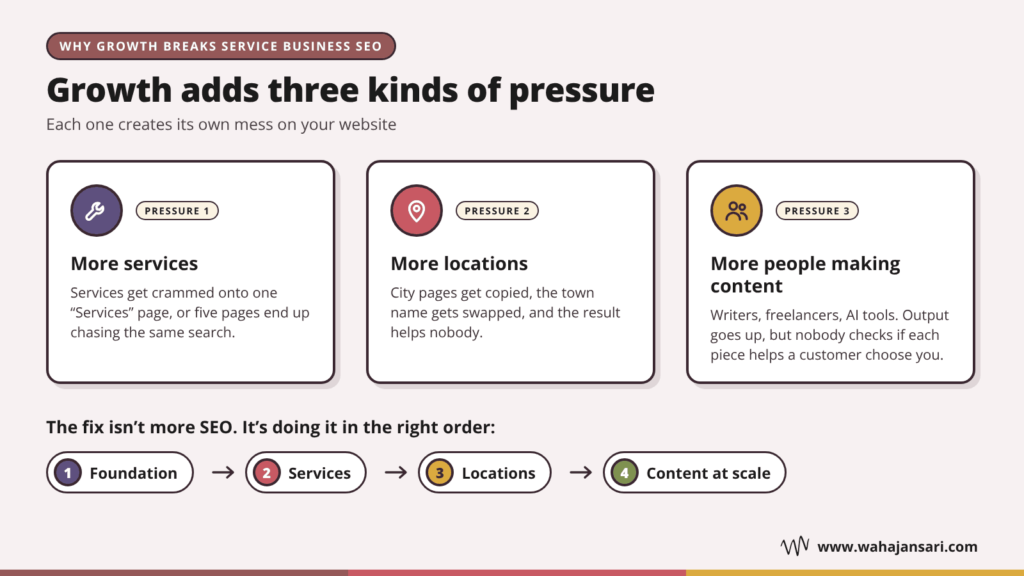
Sound familiar? The fix isn’t more SEO. It’s doing it in the right order. So let’s go stage by stage.
Stage 1: Fix the Foundation Before You Scale Anything
Here’s my blunt opinion: if your core service pages aren’t right, don’t touch city pages or blog posts yet. You’d just be adding floors to a building with a cracked base.
The foundation for a service business is short:
- One page per real service. If you do AC repair, furnace installation, and duct cleaning, that’s three pages, not one “HVAC Services” page with three paragraphs. Each page should explain what the job involves, who it’s for, rough timelines or price ranges if you can share them, proof (reviews, photos of real jobs), and one clear next step.
- A Google Business Profile that’s accurate and complete. The right category, real hours, a precise service area, photos, and replies to your reviews.
- Tracking that tells you which page brought the lead. Calls and form fills, tied to the landing page. Without this, every decision after this point is a guess.
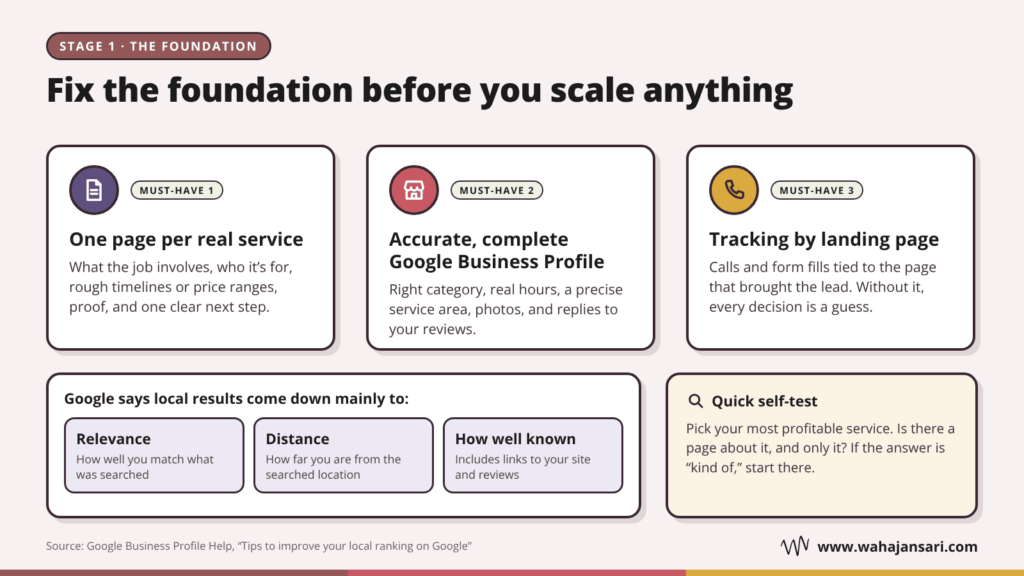
Why does the profile matter so much? Because Google’s own help page on local ranking says local results come down mainly to relevance, distance, and how well known your business is. That last one includes how many websites link to you and how many reviews you have.
And your website isn’t separate from that. Links to your site count toward how well known you are, and clear service pages make it obvious what you actually do.
So, quick self-test. Pick your most profitable service. Do you have a page about it, and only it? If the answer is “kind of,” start there.
Stage 2: Adding Services Without Creating a Mess
New services are the easiest growth to handle in SEO. They’re also the easiest to mess up.
The structure I like is simple: a hub page for each service category, individual pages for each service under it, and supporting content that points back to those service pages.
Let me give you an example. A plumbing company starts offering drain work. Instead of one “Drain Services” page that tries to rank for everything, it builds:
- Hub: Drain services (what you handle, with links to each service)
- Service pages: Drain cleaning, hydro jetting, sewer camera inspection, drain repair
- Supporting content: “Why does my kitchen drain keep clogging?” and “Hydro jetting vs snaking: which one do you need?” Each one links to the matching service page.
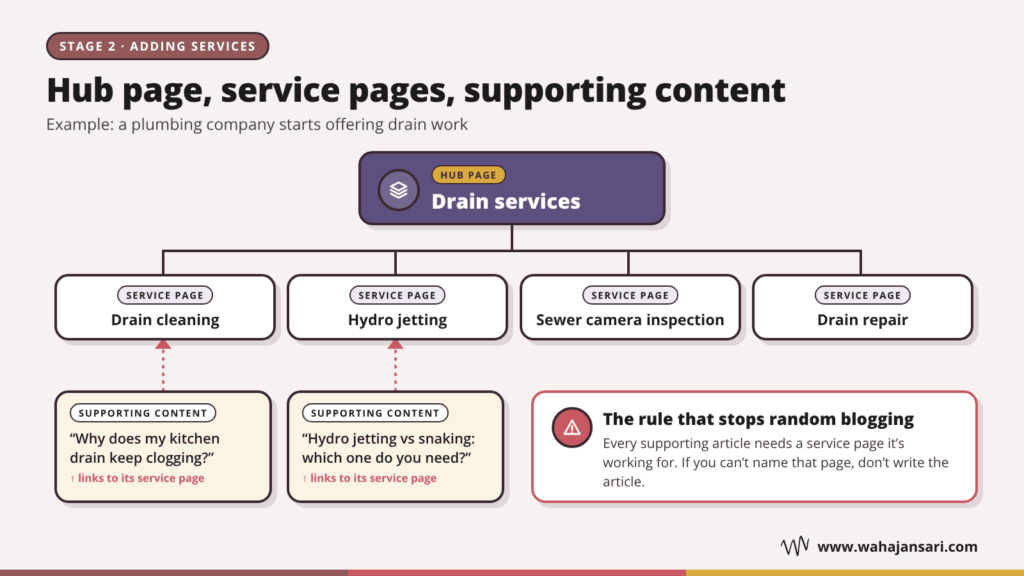
Now here’s the rule that keeps this from turning into random blogging: every supporting article needs a service page it’s working for. If you can’t name that page, don’t write the article.
A post on the history of indoor plumbing might get impressions. It won’t book a single drain cleaning.
Don’t build pages for work you can’t take on
This is the part almost nobody talks about. SEO for a growing service business should follow your capacity and your margins, not just search volume.
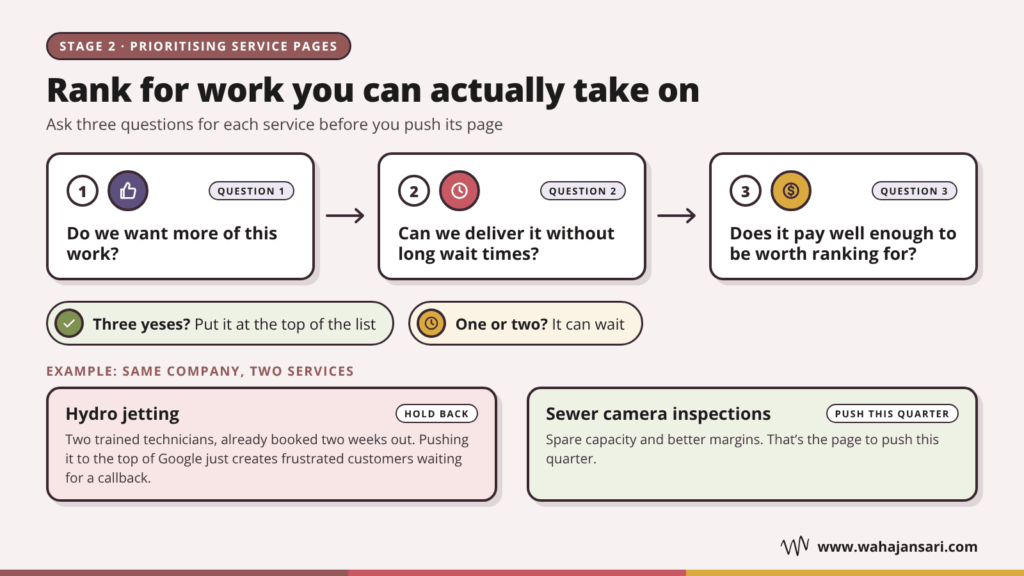
Say you have two technicians trained on hydro jetting and they’re already booked two weeks out. Pushing that page to the top of Google just creates frustrated customers waiting for a callback. Meanwhile, maybe your sewer camera inspections have spare capacity and better margins. That’s the page to push this quarter.
Before you prioritize, ask three questions for each service:
- Do we want more of this work?
- Can we deliver it without long wait times?
- Does it pay well enough to be worth ranking for?
Three yeses? Put it at the top of the list. One or two? It can wait.
Stage 3: Adding Locations (and Avoiding the City Page Trap)
This is where most service businesses get themselves into trouble.
The thinking goes: “We serve 30 towns, so let’s make 30 pages.” Then one page gets copied 30 times with the town name swapped. It’s the website version of a photocopied flyer with the city written in by hand.
Google has a name for this. Its spam policies describe doorway abuse, and one of the listed examples is pages targeted at specific regions or cities that funnel users to one page. Another is a set of substantially similar pages instead of a clear, browsable structure. That’s the copy-paste city page, described almost word for word.
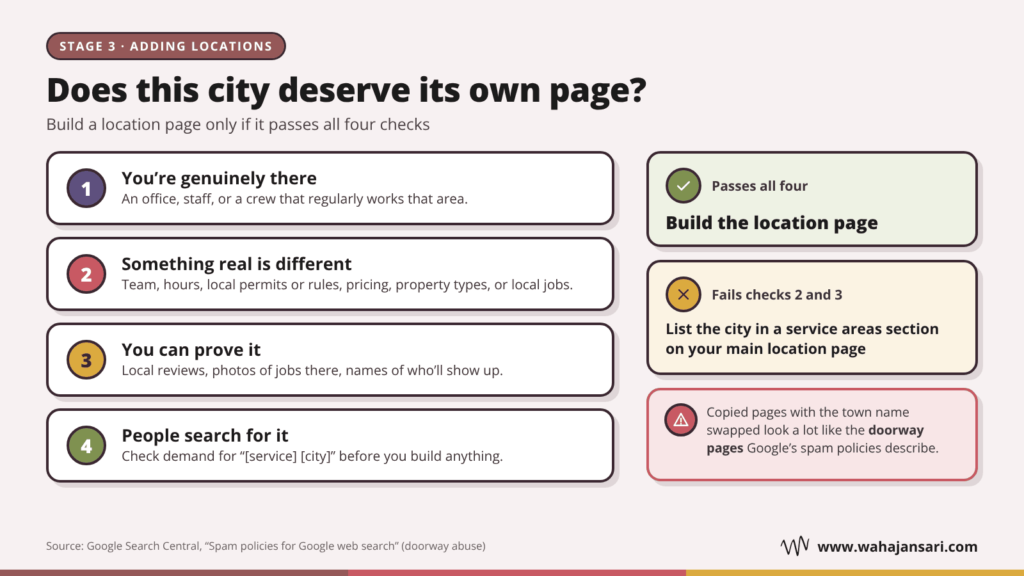
So when does a location page make sense? Here’s the checklist I’d use. Build it only if:
- You’re genuinely there. You have an office, staff, or a crew that regularly works that area.
- Something real is different. The team, the hours, local permits or rules, pricing, the types of properties you work on, or the local jobs you’ve done.
- You can prove it. Reviews from customers in that area, photos of jobs there, or the names of the people who’ll actually show up.
- People search for it. Check demand for “[service] [city]” before you build anything.
If a city fails points 2 and 3, it probably belongs in a service areas section on your main location page, not on a page of its own.
Let me tell you about an education consultancy I worked with in the UAE. They help students get into universities in the UK and Canada, and they had two real offices: one in Dubai and one in Abu Dhabi.
Their website told a different story. It had a page for every emirate, plus Al Ain. Same text on every page, same stock photo of a graduate throwing a cap in the air. Eight pages, eight caps. Only the city name changed.
The owner’s logic made sense on paper. “Students come to us from all over the country, so we should rank everywhere.”
So we ran every page through the checklist above.
Dubai and Abu Dhabi passed easily. Named counselors, real addresses, and plenty of reviews from parents in both cities. (In this business, the parent usually signs off on the decision, so their reviews carry a lot of weight.)
Sharjah was the interesting one. They had no office there. But one counselor ran free application sessions at a partner school in Sharjah every week, and a lot of their students came from Sharjah families. That’s a genuine presence. So we kept the page and rebuilt it around what was actually local: who runs the sessions, where and when they happen, and the schools their Sharjah students came from.
The rest failed points 2 and 3. They had nothing different to say and nothing to prove it. We folded them into a “Students we work with across the UAE” section on the main page and redirected the old URLs there.
Honestly, the owner was nervous. Removing pages felt like giving up on those cities.
But look at what the leads started saying. Inquiries from the Sharjah page mentioned the counselor by name and asked when the next session was. Those people had already decided to trust them. The copied pages never brought in anything like that. Mostly they brought calls asking, “Do you have an office in Fujairah?” And the honest answer was always no.
Fewer pages. Better conversations. And nothing left on the site that looks like a doorway page.
What about every service in every city?
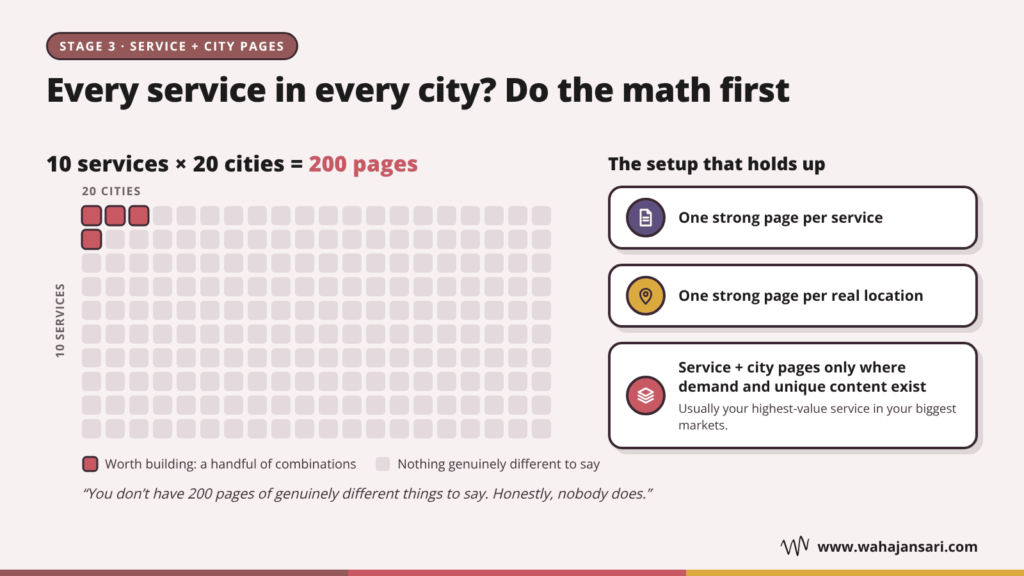
Do the math first. Ten services times twenty cities is 200 pages. You don’t have 200 pages of genuinely different things to say. Honestly, nobody does.
The setup that holds up: one strong page per service, one strong page per real location, and a service plus city page only where both the demand and the unique content exist. For most businesses, that’s a handful of combinations, usually your highest-value service in your biggest markets.
Keep your Business Profiles honest too
The same logic applies on Google Maps. Google’s Business Profile guidelines say a service business with separate locations, each with its own service area and its own staff, can have one profile per location. A rented mailing address where nobody works (a virtual office) isn’t eligible. The guidelines also say a service area generally shouldn’t stretch farther than about two hours of driving from where you’re based.
So if you’re planning to “expand” into a city by renting a mailbox, don’t. That shortcut can end with a suspended profile, which is a far bigger problem than not ranking there.
Stage 4: Scaling Content Without Becoming a Content Farm
Once the structure is in place, the bottleneck becomes output. You want more service pages, more location pages, more helpful articles. And AI makes it very tempting to just generate them all.
Here’s where you need to be careful. Google’s scaled content abuse policy covers producing lots of pages mainly to manipulate rankings rather than help people, and it applies no matter how the content is made. Using generative AI to churn out many pages without adding value is one of its listed examples.
That doesn’t mean AI is off the table. Google’s guidance on generative AI content says it can be useful for research and for structuring original content, but you need to fact-check and review everything before it goes live, including titles and meta descriptions.
So the real question isn’t “AI or no AI.” It’s this: where does the stuff only you know come from?
For a service business, it’s hiding in plain sight:
- Your technicians and staff. They know which problems come up most, what customers misunderstand, and what a job really involves.
- Your sales calls and quote forms. These are the questions people ask right before they buy. Pure gold.
- Your job photos and project notes. Real before and after shots beat stock images every time.
- Your reviews. Customers often describe the problem in the exact words other customers search with.
Google’s guide to optimizing for generative AI search draws a useful line here between commodity content (common knowledge anyone could write) and non-commodity content built on real expertise or first-hand experience. “5 tips to prevent frozen pipes” is commodity. “What our team checks first when a pipe bursts in an older home, and why” is not.
Guess which one a nervous homeowner trusts more?
A simple workflow that scales
Here’s the process I’d set up once more than one person is producing content:
- Collect questions from calls, forms, and reviews in one shared list.
- Brief each piece: which service page it supports, who it’s for, and the one question it answers.
- Interview the expert. A ten-minute voice note from the technician who does the job is usually enough.
- Draft. AI can help here, working from the brief and the expert’s notes.
- Edit and fact-check. A person checks every claim, price, and process against how you actually work.
- Link and publish. Link it to its service page, and link back from the service page where it makes sense.
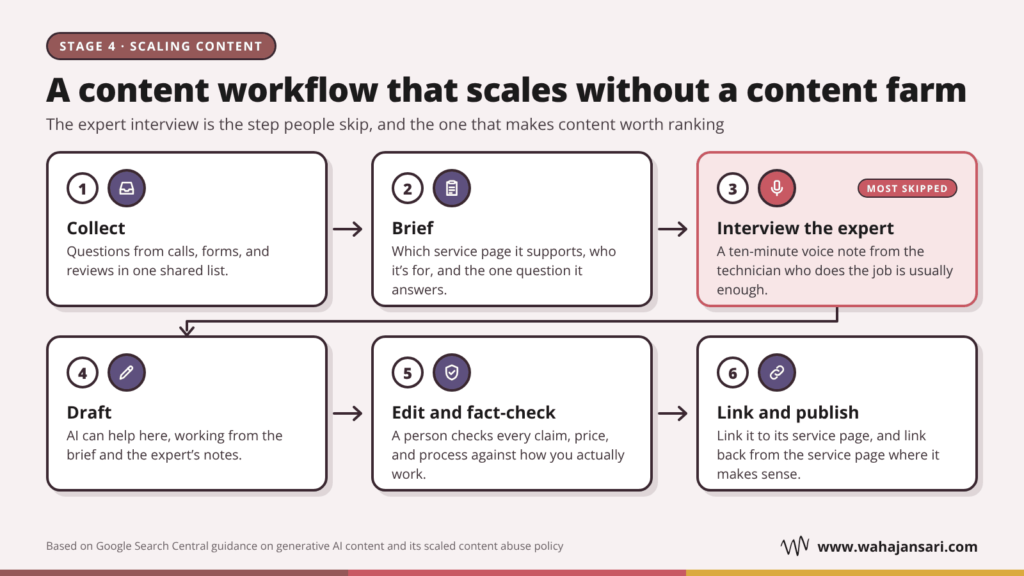
The expert interview is the step people skip, and it’s the one that makes the content worth ranking. Skip it and you’re paying to publish the same thing as everyone else, just faster.
Do You Need a Separate Strategy for AI Overviews?
Short answer: not really. And that’s good news for your budget.
Google’s guide to optimizing for generative AI search says that, from Google Search’s point of view, optimizing for these AI features is still SEO. The same guide says you don’t need llms.txt files, special markup, or to chop your content into tiny chunks. It also warns that making separate pages for every possible variation of a query, mainly to influence AI answers, falls under scaled content abuse.
Two things from that guide are worth acting on, though:
- Your Business Profile matters for AI answers too. Google notes that AI responses can include local business details, and that Business Profiles help your services show up in them.
- You can measure it. Search Console has a generative AI performance report, so you can see how you’re showing up instead of guessing.
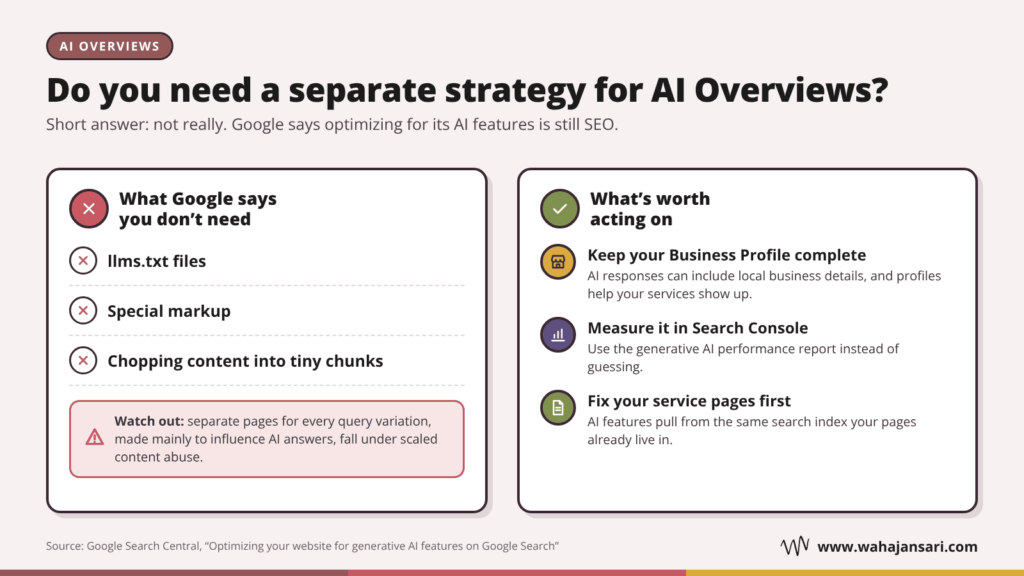
So if someone pitches you an “AI visibility” package before your service pages are sorted, my advice is simple. Fix the basics first. Google’s AI features pull from the same search index your service pages already live in.
How to Measure SEO When You’re Scaling
Total traffic is the worst number to judge a growing service business by. It’s easy to grow and easy to misread. A blog post about DIY drain cleaning can pull thousands of visits from people who will never call you, because they’re literally trying not to.
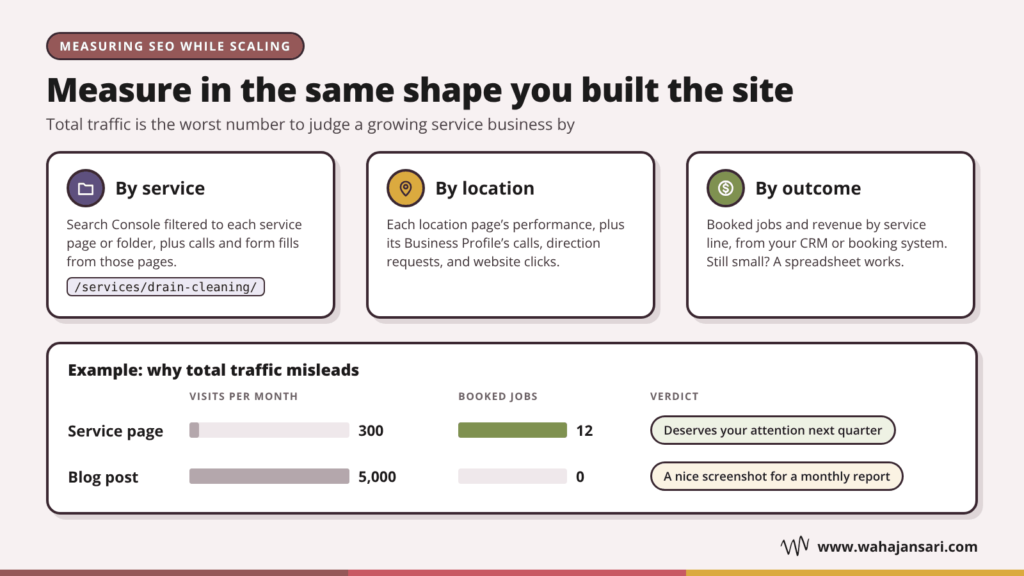
Measure in the same shape you built the site: by service and by location.
- By service: Search Console filtered to each service page or folder (like /services/drain-cleaning/), plus the calls and form fills from those pages.
- By location: each location page’s performance, plus the matching Business Profile’s calls, direction requests, and website clicks.
- By outcome: booked jobs and revenue by service line, from your CRM or booking system. If you’re still small, a simple spreadsheet works.
Let me give you an example. Say a service page gets 300 visits a month and books 12 jobs, while a blog post gets 5,000 visits and books none. The first one deserves your attention next quarter. The second one is a nice screenshot for a monthly report.
And once a month, look in Search Console for queries where a service page sits on page two. A focused update to a page that’s almost there is often a quicker win than writing something new from scratch.
Quick Answers to Common Questions
Should a service business have a blog at all?
Yes, as long as every post supports a service page. A blog that drifts into general industry news brings traffic that rarely books. Start with the questions customers ask you on the phone.
How many service pages should I have?
One for each distinct service that people search for and that you actually want to sell. Small wording variations of the same job (like “drain unclogging” and “drain cleaning”) belong on one page, not two.
Is it okay to have a page for every city I serve?
Only for cities where you have a real presence and genuinely different things to say. Copied city pages with the name swapped look a lot like the doorway pages Google’s spam policies describe.
Can I use AI to write my service pages?
For drafts and structure, sure. But someone who knows the work should add the real details, check every fact, and make sure the page says something a competitor’s page couldn’t.
Final Thoughts
If you take one thing from this post, make it this: your website should grow in the same shape as your business. Not faster, and not in a different direction.
Get your core service pages and Business Profile right. Add services as hubs with real pages underneath. Add locations only where you’re genuinely present and have something different to say. And when you scale content, scale the expert input, not just the word count.
Dear growing service business owner: you don’t need 200 pages. You need the right 20, done properly, and then the next 20. That’s how SEO keeps up with your growth instead of getting in its way.
Discover more from Wahaj Ansari
Subscribe to get the latest posts sent to your email.