
Your site runs on Next.js. The pages are server-rendered. So SEO is sorted, right?
Mostly. But there’s a step that happens on every single page load, right after the HTML arrives, that almost nobody checks in an SEO audit. It’s called hydration. And when it goes wrong, Google, ChatGPT and your actual visitors can each end up seeing a slightly different version of the same page.
So let’s talk about the real impact of hydration on JavaScript SEO. Not the scary version, and not the “relax, it’s fine” version either. The honest one: when it’s harmless, when it quietly hurts you, how to check your own site, and what to hand your developer.
Short answer: Hydration doesn’t hurt SEO by itself. Google even lists it as a recommended rendering approach. It becomes a problem when the server HTML and the hydrated page don’t match, when important tags or content change after JavaScript runs, or when heavy hydration makes the page slow to respond to clicks and taps.
What Hydration Actually Does (No Jargon, Promise)
Let me give you an example.
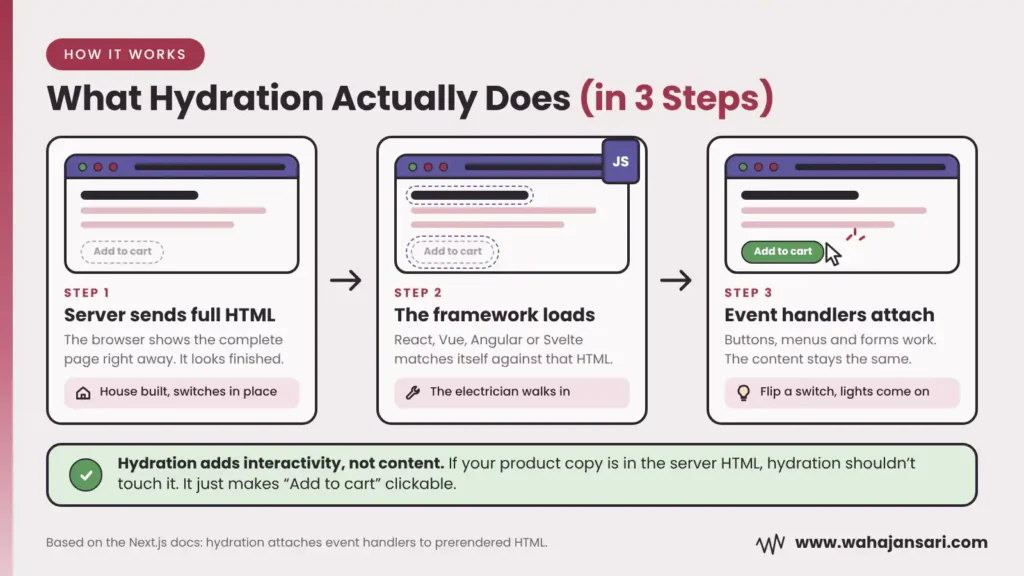
You buy a brand new house. The builder hands you the keys, and everything’s there: walls, doors, light switches, the lot. It looks finished. But the electrician hasn’t come yet, so you flip a switch and nothing happens.
That house is your server-rendered HTML. Hydration is the electrician walking in and connecting every switch to the wiring. The house doesn’t change. The switches just start working.
In technical terms, the server sends a complete HTML page, the browser shows it right away, and then the JavaScript framework (React, Vue, Angular, Svelte and friends) loads, matches itself against that HTML, and attaches the event handlers that make buttons, menus and forms actually do something. The Next.js documentation describes it exactly this way: React turning prerendered HTML into an interactive app by attaching event handlers.
Here’s the part that matters for SEO: hydration is supposed to add interactivity, not content. If your product description is in the server HTML, hydration shouldn’t touch it. It just makes the “Add to cart” button clickable.
So why do SEO people get nervous about it? Mostly because hydration gets mixed up with client-side rendering. And those are very different animals.
Hydration vs Client-Side Rendering: Don’t Mix Them Up
Some articles about hydration and SEO actually describe client-side rendering problems and blame hydration for them. I disagree with that framing, because it sends you looking for the wrong fix.
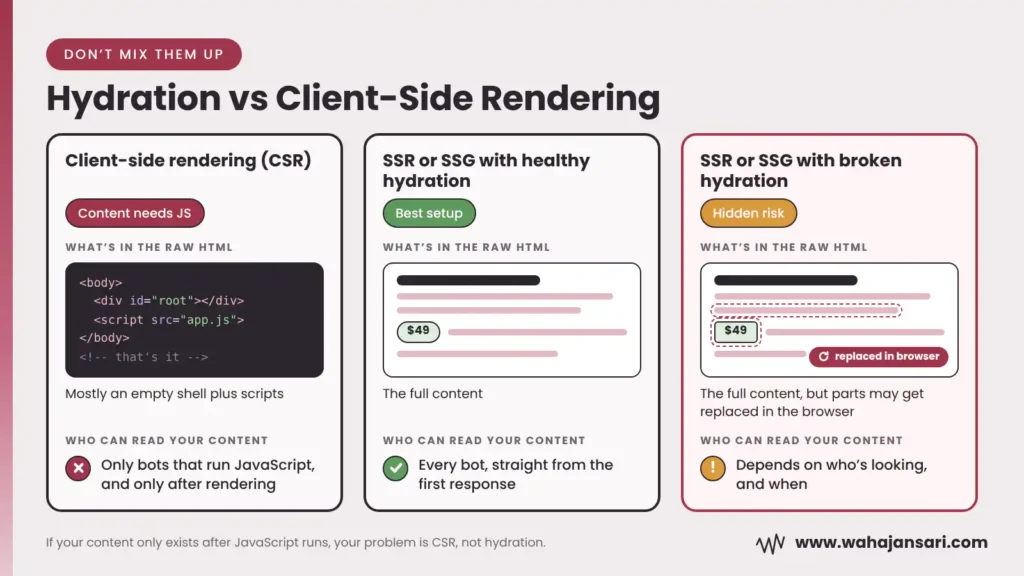
With client-side rendering (CSR), the server sends an almost empty page: a single <div id=”root”> and a pile of JavaScript. The content only shows up after that JavaScript runs. Any bot that doesn’t run JavaScript sees an empty box.
With server-side rendering (SSR) or static generation (SSG), the content is already in the HTML. Hydration happens afterwards, just to wire things up.
| Setup | What’s in the raw HTML | Who can read your content |
|---|---|---|
| Client-side rendering (CSR) | Mostly an empty shell plus scripts | Only bots that run JavaScript, and only after rendering |
| SSR or SSG with healthy hydration | The full content | Every bot, straight from the first response |
| SSR or SSG with broken hydration | The full content, but parts may get replaced in the browser | Depends on who’s looking, and when |
That last row is what this whole post is about.
So the next time someone tells you “hydration is bad for SEO”, ask them which row they mean. If your content only exists after JavaScript runs, your problem is CSR, not hydration. Different problem, different fix.
Google Isn’t Against Hydration (It Actually Recommends It)
If a developer has ever told you “we can’t do SSR with hydration, it’s bad for SEO”, this section is for you.
In its dynamic rendering documentation, Google calls dynamic rendering a workaround and points site owners to server-side rendering, static rendering or hydration instead. Hydration is literally on Google’s list of good options.
And Google’s JavaScript SEO basics guide (updated March 2026) still says server-side rendering or pre-rendering is a great idea, partly because not every bot can run JavaScript.
So SSR plus hydration isn’t a risky setup. It’s the right one. Server HTML for bots and a fast first paint, hydration for interactivity. Best of both worlds.
The trouble starts when the two halves stop agreeing with each other. Let’s look at exactly how that happens.
5 Ways Hydration Can Hurt Your JavaScript SEO
1. Hydration Mismatches Can Throw Your Server HTML Away
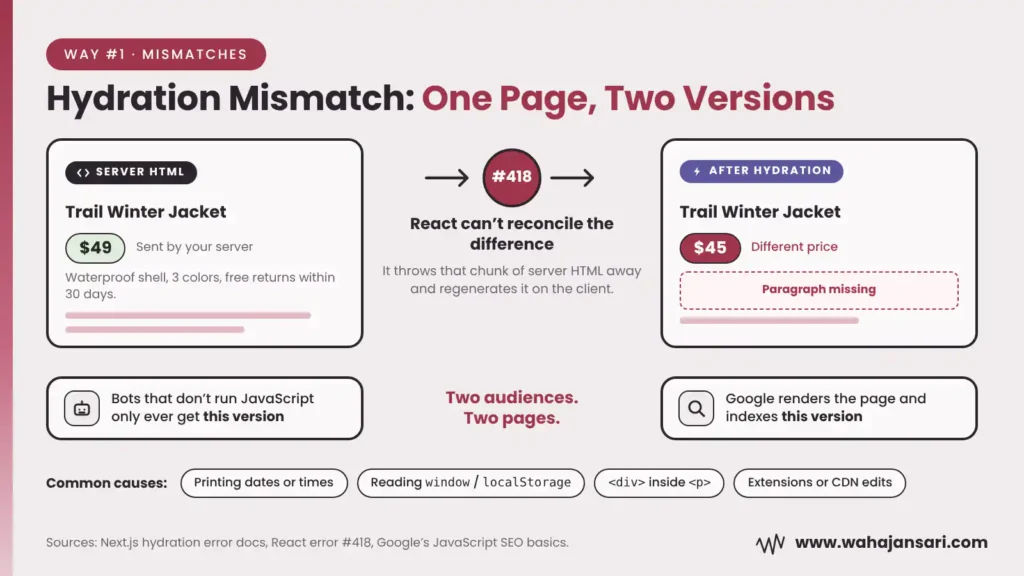
A hydration mismatch is when the HTML your server sent doesn’t match what the framework renders in the browser on its first pass. The usual causes are boring, everyday code:
- Printing a date or time, so the server and the browser show different values
- Reading window or localStorage while rendering
- Invalid HTML nesting, like a <div> inside a <p>
- A browser extension or a CDN changing the HTML before the framework gets to it
All of these appear in the official Next.js list of hydration error causes. Small stuff, right?
Here’s why it isn’t small. When React hits a mismatch it can’t reconcile, it regenerates that part of the page on the client. In plain English: it throws away that chunk of your server HTML and rebuilds it in the browser. React’s own hydrateRoot docs tell developers to treat mismatches as bugs, and warn that in the worst case, event handlers end up attached to the wrong elements.
Now think about what Google sees. Google crawls your raw HTML first, then queues the page and renders it later in headless Chromium, and it uses the rendered HTML for indexing (Google’s JavaScript SEO basics). How long is “later”? A 2024 study of over 100,000 Googlebot fetches, published by Vercel, found the median gap between crawl and render was about 10 seconds, but the slowest 10% of pages waited around 3 hours or more.
If the rebuilt section is identical to the server version, no harm done. But if it’s different (a different price, a missing paragraph, a heading that changes), you now have two versions of your page. Google indexes the rendered one. Bots that don’t run JavaScript only ever get the server one.
Two audiences. Two pages. Neither of them is necessarily the one you wanted.
2. Tags That Change After Hydration May Never Be Seen
This one’s sneaky.
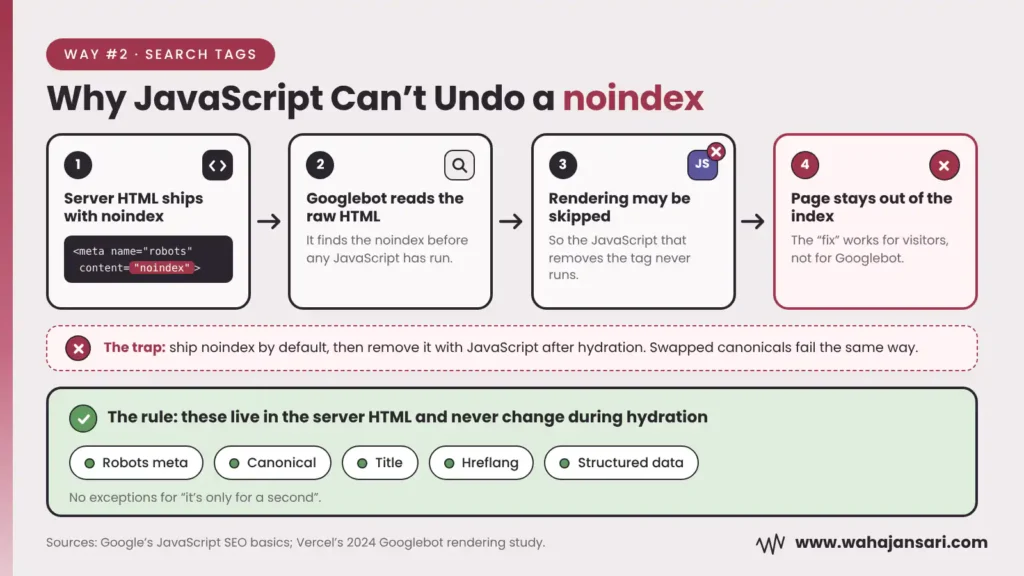
Say your template ships a noindex tag in the server HTML by default, and your JavaScript removes it once the page hydrates. Logically, the page should end up indexable.
Google doesn’t play along. Its JavaScript SEO documentation says that when it finds noindex, it may skip rendering and JavaScript entirely. The Vercel study saw the same thing in practice: pages with noindex in the initial HTML weren’t rendered. So your JavaScript “fix” never runs for Googlebot. The page just stays out.
Canonicals have the same problem. Google says the best place for a canonical is plain HTML, and if JavaScript does touch it, it should keep the same value as the original HTML rather than point to a different URL. So no “set one canonical in the template, swap it in JavaScript later” tricks. Google sees through those about as well as your mom sees through “I’ll clean my room later”.
Here’s my rule, and I’d give it to any dev team: anything that tells search engines what to do with a page (robots meta, canonical, title, hreflang, structured data) lives in the server HTML and never changes during hydration. No exceptions for “it’s only for a second”.
3. The Quick “Fix” That Hides Content From Bots
This one rarely gets talked about, and it’s the most avoidable of the lot.
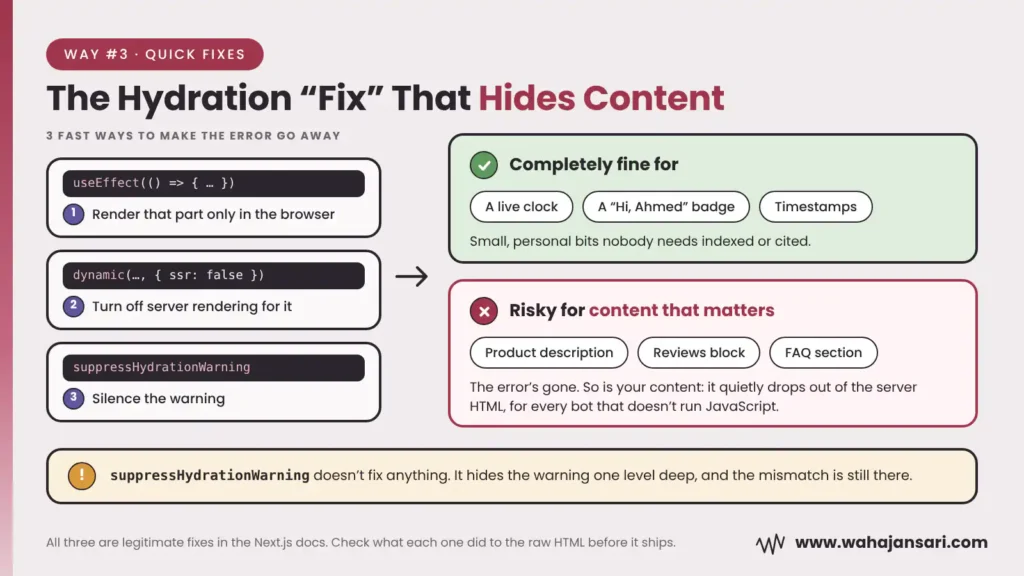
When a developer sees a hydration error, the fastest ways to make it go away are:
- Render that part only in the browser, using useEffect
- Turn off server rendering for that component (in Next.js, ssr: false on a dynamic import)
- Silence the warning with suppressHydrationWarning
All three are listed as legitimate fixes in the Next.js docs. And for a live clock or a “Hi, Ahmed” badge, they’re completely fine.
But apply the same fix to a product description, a reviews block or your FAQ section, and that content quietly disappears from the server HTML. The error’s gone. So is your content, for every bot that doesn’t run JavaScript.
And suppressHydrationWarning doesn’t fix anything. It only hides the warning one level deep, and React won’t even try to patch mismatched text under it. The mismatch is still there. You just can’t hear it anymore.
So here’s my question to you: does anyone on your team check what a hydration fix did to the raw HTML before it ships? If the answer is no, that’s probably the cheapest SEO win you’ll find this year.
4. Heavy Hydration Makes the Page Look Ready When It Isn’t
Back to the house. The lights are on, the switches are on the wall, but the electrician is still in the basement. You flip a switch. Nothing. You flip it again, harder this time, as if that helps. Still nothing.
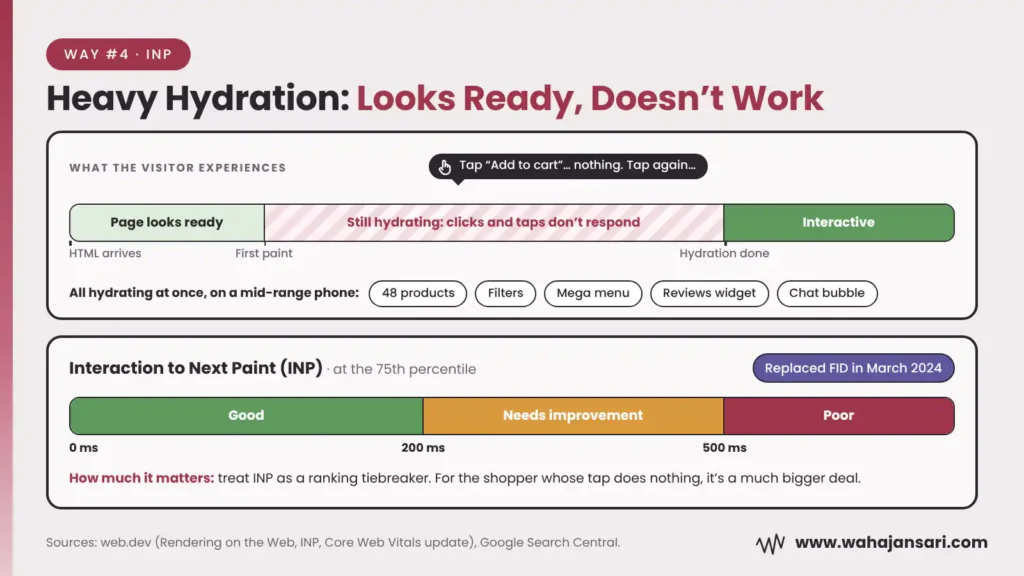
That’s exactly the gap web.dev’s rendering guide warns about: a server-rendered page can look ready while its interactive features don’t work until the client JavaScript has run. The same guide notes this can hurt Total Blocking Time and Interaction to Next Paint, even when the first paint is fast.
INP is the Core Web Vital for responsiveness. It replaced First Input Delay in March 2024, and a good INP score is 200 milliseconds or less at the 75th percentile. Anything over 500 milliseconds is rated poor.
Picture a category page with 48 products, filters, a mega menu, a reviews widget and a chat bubble, all hydrating at once on a mid-range phone. That’s where hydration really bites.
Now, let’s be honest about the ranking weight. Google recommends good Core Web Vitals and says they line up with what its ranking systems aim to reward. That’s not the same as “fix INP and jump to position one”. I’d treat INP as a tiebreaker for rankings, and a much bigger deal for the human who taps “Add to cart” and watches nothing happen.
5. AI Crawlers Only See Your Server HTML
This is the part that’s become a lot more important since AI search took off.
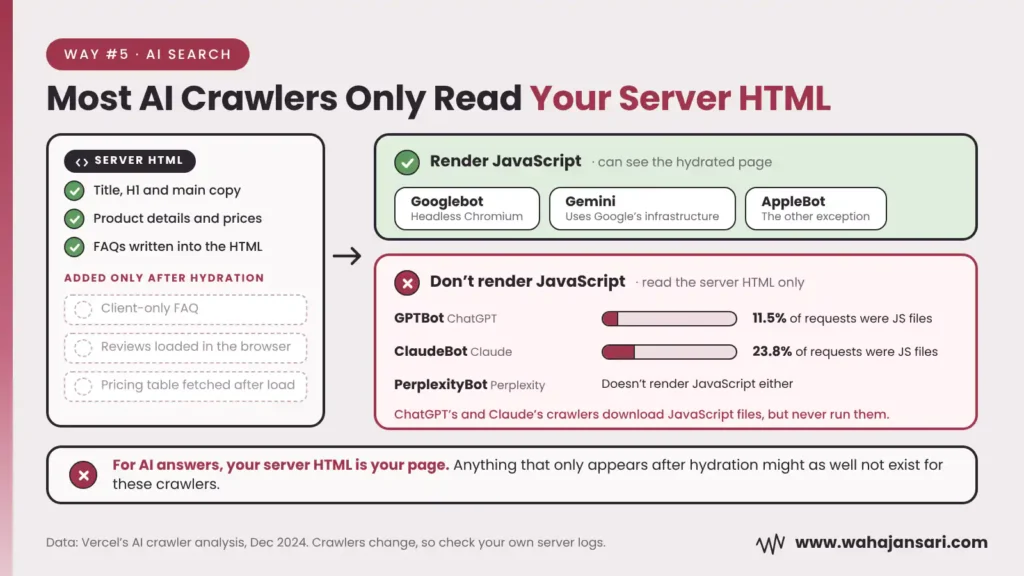
Googlebot renders JavaScript. Most AI crawlers don’t. Vercel’s December 2024 analysis of crawler traffic found that none of the major AI crawlers it tracked rendered JavaScript, including GPTBot, ClaudeBot and PerplexityBot. ChatGPT’s and Claude’s crawlers did download JavaScript files (about 11.5% and 23.8% of their requests), they just never ran them. Gemini, which uses Google’s infrastructure, and AppleBot were the exceptions.
Crawler behavior changes, and that data is from late 2024, so check your own server logs rather than trusting any single study forever.
But the takeaway is simple: for AI answers, your server HTML is your page. Anything that only appears after hydration (a client-only FAQ, reviews loaded in the browser, a pricing table fetched after load) might as well not exist for those crawlers. If you want to get cited in AI answers, this matters more than your INP score.
How to Check If Hydration Is Hurting Your Site
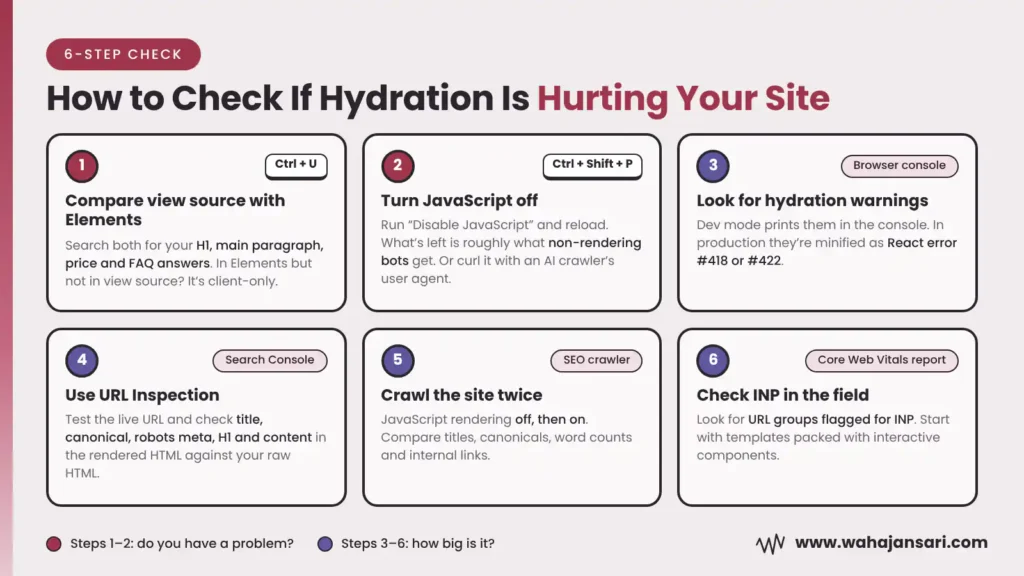
You don’t need to read React source code for this. Here’s the order I’d check things in:
- Compare view source with the Elements panel. Press Ctrl+U to see the raw HTML, then open DevTools and look at the Elements panel (that’s the hydrated page). Search both for your H1, main paragraph, price and FAQ answers. If something is in Elements but not in view source, it’s client-only.
- Turn JavaScript off. In Chrome DevTools, open the Command Menu (Ctrl+Shift+P), run “Disable JavaScript” and reload. What’s left is roughly what non-rendering bots get. For a second opinion, fetch the page from the command line with curl using an AI crawler’s user agent and read the raw response.
- Look for hydration warnings. In development mode, React prints hydration warnings straight to the browser console. In production they show up minified, as error #418 or #422. If your developers use error monitoring, ask them to search for those numbers.
- Use URL Inspection in Search Console. Test the live URL and open the rendered HTML Google produced. Check the title, canonical, robots meta, H1 and main content against your raw HTML. They should match.
- Crawl the site twice. Run your SEO crawler once with JavaScript rendering off and once with it on. Then compare titles, canonicals, word counts and internal links. Big differences between the two crawls are your shortlist.
- Check INP in the field. Open the Core Web Vitals report in Search Console and look for URL groups flagged for INP. Templates packed with interactive components are where I’d look first.
Most of the time, steps 1 and 2 alone tell you whether you have a problem. The other four tell you how big it is.
What to Fix First
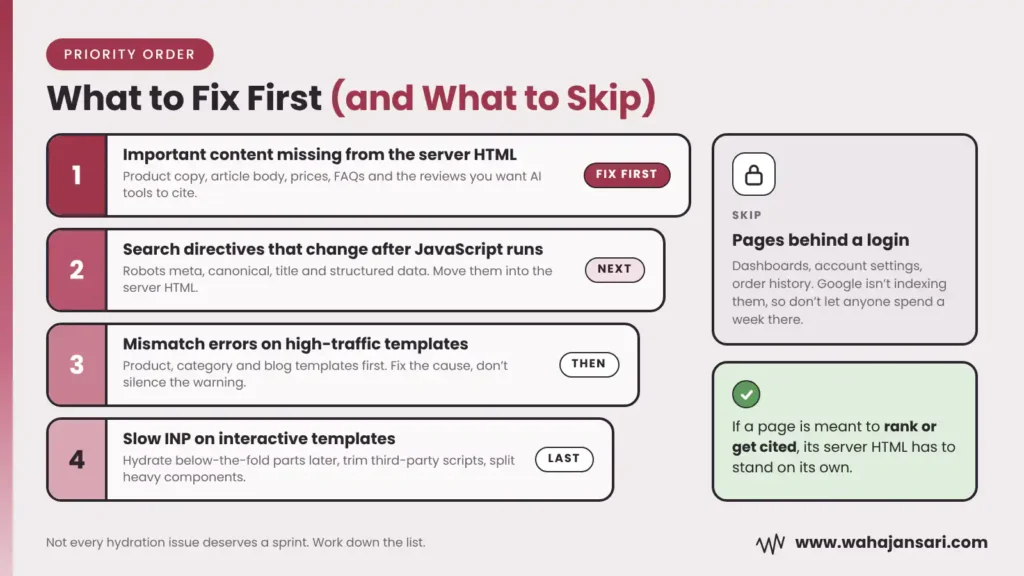
Not every hydration issue deserves a sprint. Here’s how I’d prioritize:
- Important content missing from the server HTML. Product copy, article body, prices, FAQs, the reviews you want AI tools to cite. This affects every non-rendering bot and Google’s first look at the page, so it goes first.
- Search directives that change after JavaScript runs. Robots meta, canonical, title and structured data. Move them into the server HTML and keep them stable.
- Mismatch errors on high-traffic templates. Product, category and blog templates before random edge pages. Fix the cause (consistent data on server and client, valid HTML, browser-only code moved into effects) instead of silencing the warning.
- Slow INP on interactive templates. Hydrate below-the-fold components later, trim third-party scripts and break up heavy components.
And one condition before you start. If a page lives behind a login (dashboards, account settings, order history), hydration SEO doesn’t matter there, because Google isn’t indexing those pages anyway. Don’t let anyone spend a week on them. If a page is meant to rank or get cited, its server HTML has to stand on its own.
Do Newer Frameworks Solve the Hydration Problem?
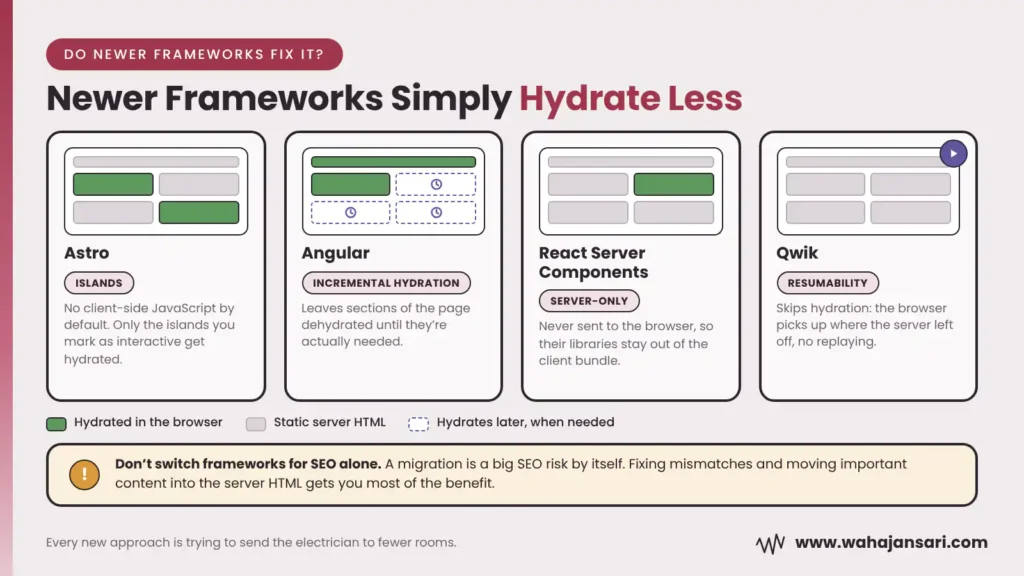
Partly. The whole industry is clearly moving toward hydrating less:
- Astro ships no client-side JavaScript by default and only hydrates the “islands” you mark as interactive.
- Angular has incremental hydration, which leaves sections of the page dehydrated until they’re actually needed.
- React Server Components aren’t sent to the browser at all, so the libraries they use stay out of the client bundle.
- Qwik skips hydration with what it calls resumability: the browser picks up where the server left off instead of replaying the whole app.
Notice the pattern? Every new approach is basically trying to send the electrician to fewer rooms.
My honest take? Don’t switch frameworks for SEO alone. A migration is a big SEO risk all by itself. If you’re already planning a rebuild, sure, pick something that hydrates less. If you’re not, fixing mismatches and moving important content into the server HTML gets you most of the benefit for a fraction of the effort and stress.
Hydration and SEO: Quick Answers
Does hydration directly affect Google rankings?
No. There’s no “hydration” ranking signal. It affects SEO indirectly: through which content and tags Google indexes after rendering, through what non-rendering bots can read, and through Core Web Vitals like INP.
Is suppressHydrationWarning bad for SEO?
Not on its own. It’s fine for tiny things like timestamps. It becomes a problem when it’s used to hide mismatches in content that matters, because the mismatch is still there and React won’t patch the text.
Is server-side rendering enough for JavaScript SEO?
It’s the right foundation, not the finish line. You still need the server HTML and the hydrated page to match, and your search tags to stay the same after JavaScript runs.
Do AI crawlers see hydrated content?
Based on Vercel’s 2024 data, most major AI crawlers don’t run JavaScript, so they only read your server HTML. Gemini is the main exception because it uses Google’s rendering infrastructure.
Final Thoughts
Hydration isn’t the villain. It’s the right way to build a fast, interactive JavaScript site, and Google is fully on board with it.
The danger is the gap. The moment your server HTML and your hydrated page start telling different stories, Google, AI crawlers and your visitors stop seeing the same page. And you don’t get a notification when that happens.
So keep it simple. Make your server HTML complete enough to stand on its own. Keep your search tags out of JavaScript’s reach. And treat every hydration warning like a bug, not background noise.
If you’re an SEO, you don’t need to fix React code yourself. You just need to know where to look and what to ask for. Now you do.
Discover more from Wahaj Ansari
Subscribe to get the latest posts sent to your email.