
You launched your German site. You translated every page. You even added hreflang tags.
And three months later, German searchers are still landing on your English pages. Or worse, they’re not landing anywhere at all.
Here’s the thing: going international doesn’t just double your SEO work. It multiplies the number of ways things can quietly break. So in this post, I’ll walk you through the most common international SEO mistakes to avoid, why each one hurts, and the fix I’d use. No theory dump. Just the stuff that actually decides whether your new market works or flops.
Quick answer: The most common international SEO mistakes are translating instead of localizing, reusing one keyword list for every country, broken or invalid hreflang tags, canonical tags that cancel hreflang, auto-redirecting visitors by IP, mixing URL structures, ignoring non-Google search engines, and measuring every market as one blended number.
Now let’s break each one down.
Mistake 1: Launching a Country Before Checking If Anyone Wants You There
Most international SEO projects start with “the CEO wants a French site.” Not with data.
That’s backwards. Before you build anything, open Google Search Console, go to the Performance report, and filter by country. You’ll often find you’re already getting impressions from markets you never targeted. That’s free market research, sitting right there.
Let me give you an example. Say your English site gets 8,000 impressions a month from the UAE and only 300 from France. Building a French site first because “France is a big market” ignores what search is already telling you.
So here’s what I’d do before picking a market:
- Check country-level impressions and clicks in Search Console.
- Run keyword research in that market’s language (more on this in a second).
- Ask the boring business questions: can you ship there, take payments there, and support customers there?
If the answer to number three is no, no amount of SEO will save you.
Mistake 2: Assuming Google Is the Only Search Engine That Matters
Google owns most markets. Most. Not all.
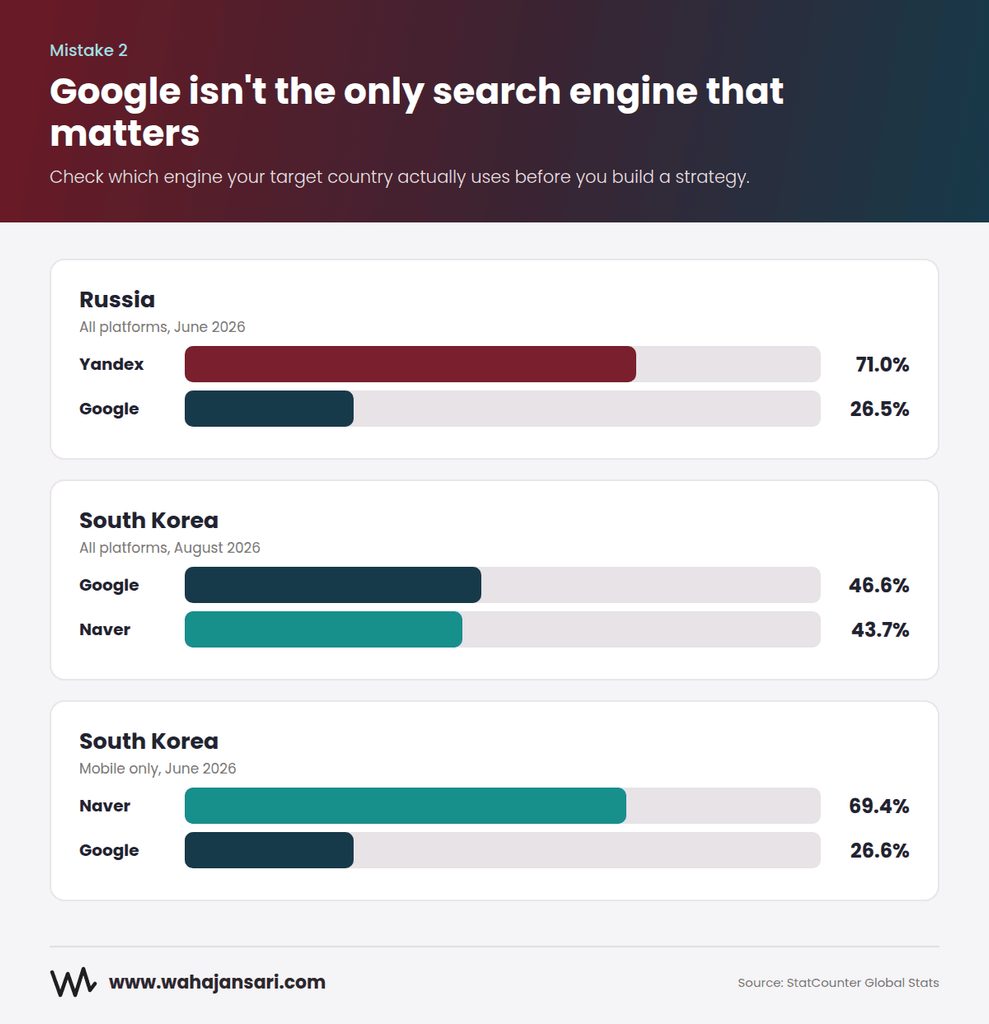
In Russia, Yandex held about 71% of the search market in June 2026, with Google at roughly 26.5%, according to StatCounter. South Korea is even more interesting. Across all platforms in August 2026, Google and Naver were nearly neck and neck (about 46.6% vs 43.7%, per StatCounter), but on mobile alone Naver took around 69% in June 2026, per StatCounter’s mobile data.
Think about what that means. If you’re targeting Korean consumers who mostly search on their phones, a Google-only strategy is like opening a shop and putting the sign on the back wall.
Each of these engines has its own webmaster tools, its own ecosystem, and its own idea of what a good result looks like. So before you enter a market, spend ten minutes checking which engine people there actually use. It’s the cheapest research you’ll ever do.
Mistake 3: Using One Keyword List for Every Market
This one sounds obvious, right? Yet it’s everywhere.
The usual shortcut: take your English keyword list, run it through a translator, and call it “German keyword research.” The problem is that people don’t search in translations. They search in their own words.
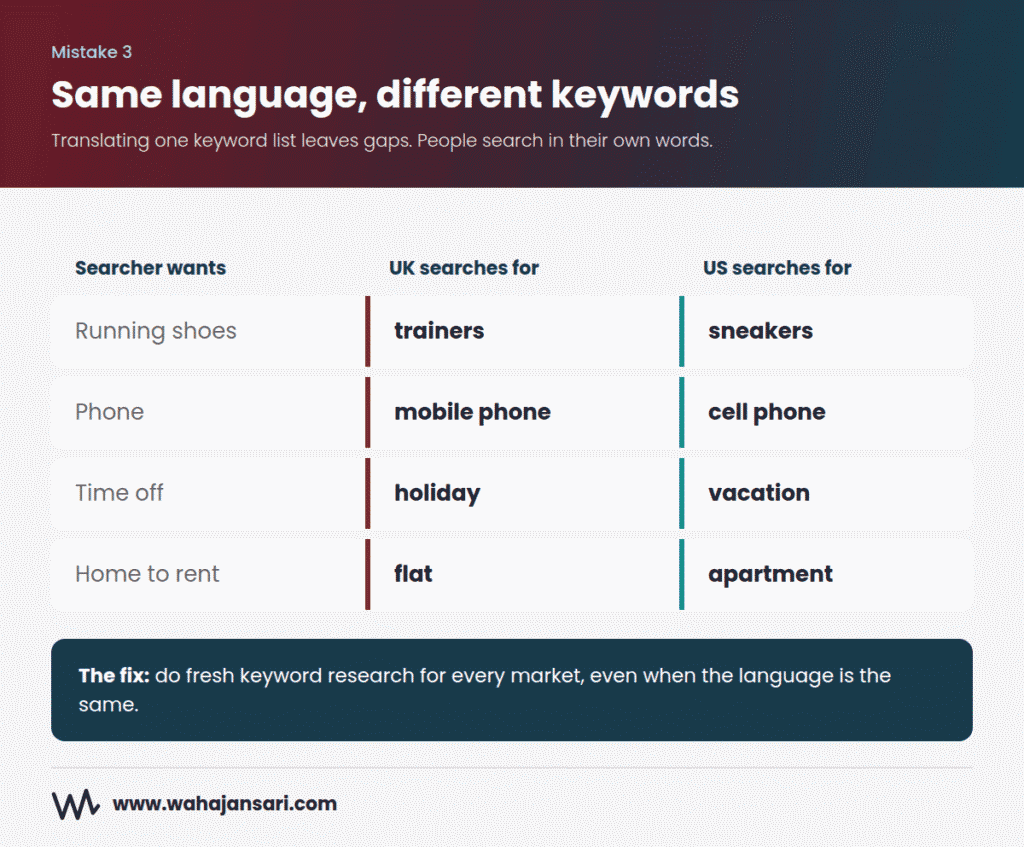
And it’s not just a different-language problem. Same language, different country, different keywords:
- A UK shopper searches for “trainers.” A US shopper searches for “sneakers.”
- Brits look for a “mobile phone.” Americans look for a “cell phone.”
- Spanish in Mexico and Spanish in Spain use different everyday words for plenty of products.
If your en-GB page is optimized for “sneakers,” you’ve basically built a page for the wrong country with the right flag on it.
The fix: Do fresh keyword research per market, in that market’s database, ideally with a native speaker reviewing the list. Treat it like you’re doing SEO for a brand-new site, because in a way, you are.
Mistake 4: Translating Instead of Localizing
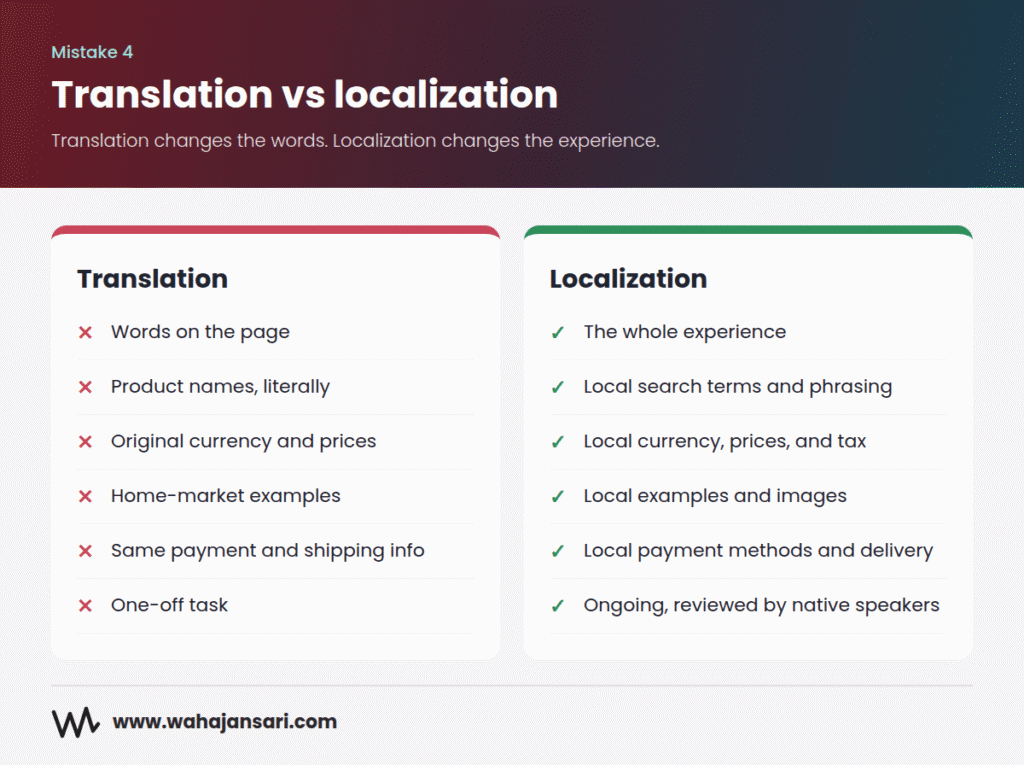
Translation changes the words. Localization changes the experience. Big difference.
A perfectly translated page can still fail if it shows prices in dollars to a German visitor, lists payment methods nobody uses there, talks about shipping times that don’t apply, or uses imagery and examples that feel foreign.
Here’s how I like to think about it. Translation is dubbing a movie. Localization is remaking it for a new audience. Dubbing works for some scenes, but if the jokes don’t land, the audience walks out.
Things to localize on every market version:
- Currency, prices, and tax display
- Payment methods and shipping information
- Units, date formats, and phone number formats
- Local address and contact details (if you have them)
- Examples, references, and images
- Legal claims and advertising language, since what you’re allowed to say about a product varies by country
Bonus: some of these also help search engines. Google’s own documentation lists local addresses, phone numbers, local language and currency among the signals it uses to figure out who a page is for. So localizing isn’t just good manners. It’s a ranking input.
Mistake 5: Publishing Machine Translation Without a Human Check
Let me be clear: I’m not against AI translation. It’s fast, it’s cheap, and it’s honestly pretty good now.
What I’m against is hitting “translate all” on 4,000 pages and publishing them untouched.
Google’s spam policies name automated transformations, including translation, as one of the ways sites create scaled content abuse when the result adds little value for users. Read that carefully. The issue isn’t the tool. It’s mass-producing pages nobody reviewed.
There’s also a simpler problem: unreviewed translations read badly. Wrong product terms, awkward phrasing, and literal idioms make visitors bounce, and they make your brand look like it doesn’t really operate in that country.
My middle ground: Use AI or a translation tool for the first draft. Then have a native speaker review it, fix the terminology, and swap in localized keywords. Start with your money pages (home, category, product, service pages) and roll out the rest gradually.
Mistake 6: Cloning Country Sites With Nothing Actually Local on Them
You’ve got example.com/us/, example.com/uk/, example.com/au/ and example.com/ca/. All four are in English. All four are identical except the flag in the header.
Now you might be wondering: is that a duplicate content penalty?
Not a penalty, no. But Google will likely treat those near-identical pages as duplicates and pick one to show, which may not be the one you want in each country. Google’s documentation says that for similar content in the same language across regions, you should pick a preferred version and use canonical and hreflang tags so the right URL gets served.
And if you go further and spin up lots of regional domains or pages that just funnel people to the same place, you start drifting toward what Google calls doorway abuse in its spam policies.
The fix: Only create a regional version when you have something genuinely regional to say. Different prices, different stock, different shipping, different contact details, different legal info. If the UK page would be 100% identical to the US page, ask yourself honestly whether you need it yet.
Mistake 7: Choosing a URL Structure Based on Myths (or Mixing All of Them)
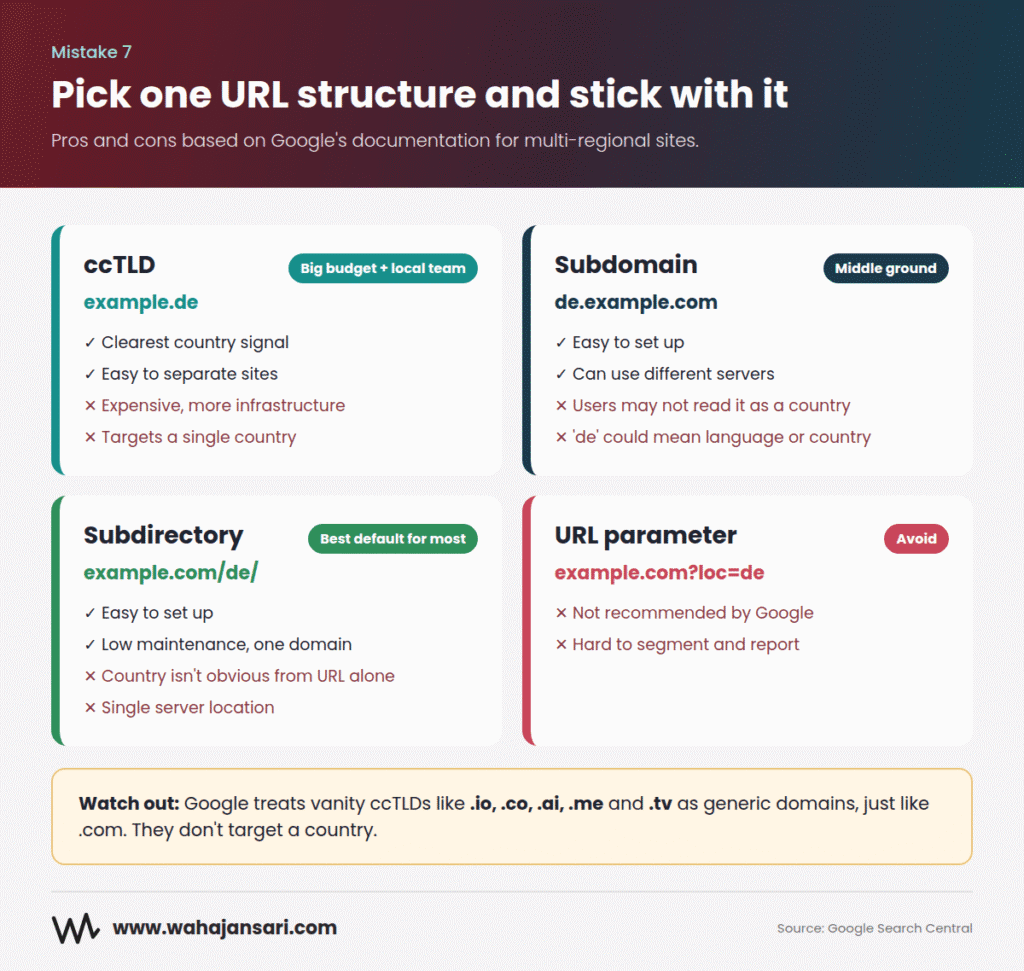
You have three main options:
- ccTLD: example.de
- Subdomain: de.example.com
- Subdirectory: example.com/de/
There’s a common myth that ccTLDs are the only “real” way to do international SEO. They’re not. Google’s documentation lays out pros and cons for all three. ccTLDs give the clearest country signal but are expensive and harder to run. Subdirectories are easy to set up and low maintenance. Subdomains sit somewhere in between. The one structure Google flat out doesn’t recommend is URL parameters, like site.com?loc=de.
Here’s what most guides don’t mention: some country domains aren’t treated as country domains at all. Google treats vanity ccTLDs like .io, .co, .ai, .me and .tv as generic domains, the same as .com. So if you bought a .co domain thinking it’ll help you rank in Colombia, it won’t do that job for you.
The other mistake is mixing structures. One region on a ccTLD, another on a subdomain, a third in a subfolder. This usually happens when different country teams make their own decisions over the years, and it turns maintenance, hreflang, and reporting into a mess.
What I’d do: For most small and mid-sized businesses, subdirectories are the sensible default. One domain, one set of authority, easy to manage. Go ccTLD only if you have the budget, the local team, and a strong reason (like legal requirements or a market where local trust really depends on it). Whatever you pick, pick one and stick with it.
Mistake 8: Getting Hreflang Wrong (Which Is Very Easy to Do)
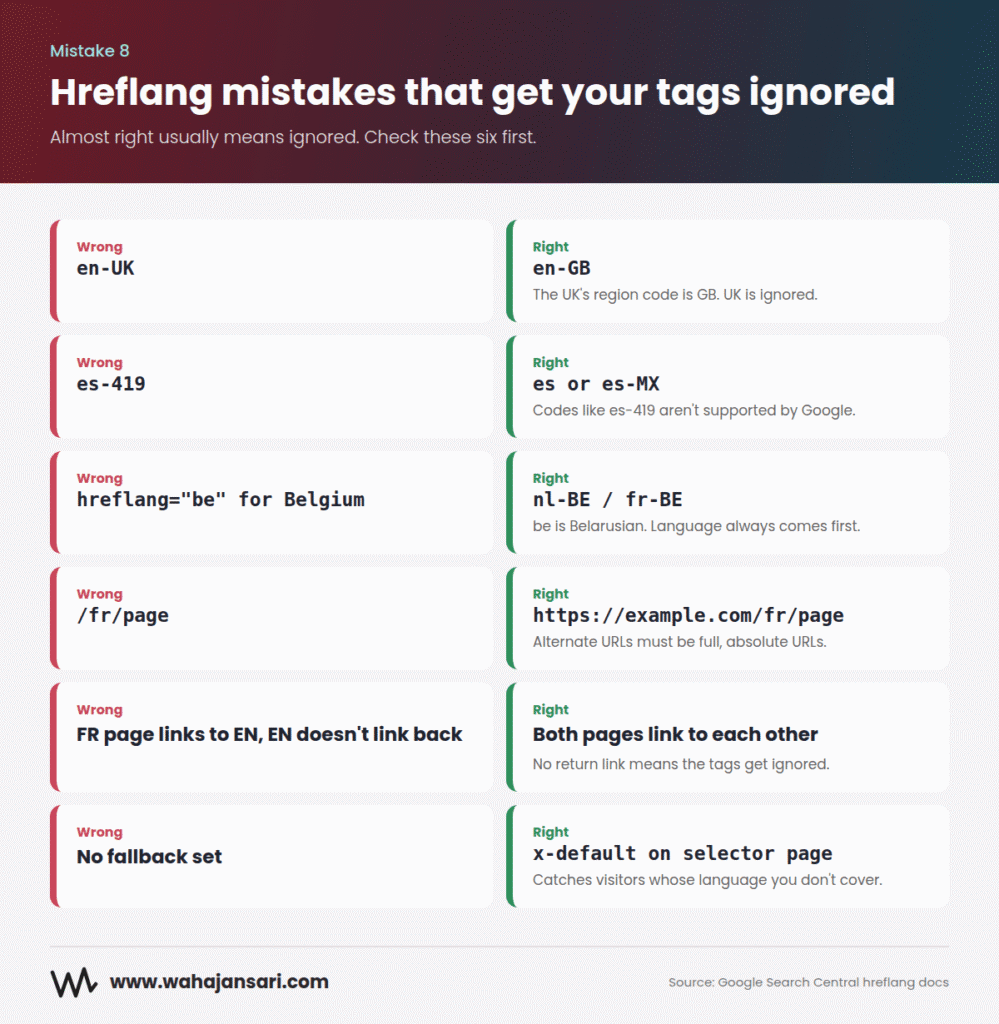
Hreflang is where most international SEO projects break. Not because it’s hard to understand, but because it’s easy to get almost right. And almost right often means ignored.
Here are the errors I’d check first, all straight from Google’s hreflang documentation:
- Missing return links. If your German page points to your English page, the English page must point back. If two pages don’t confirm each other, Google ignores the tags.
- No self-reference. Each version has to list itself as well as all the others.
- Invalid region codes. The UK’s code is GB, not UK. Google says codes like UK or EU have no effect. Codes like es-419 (Latin American Spanish) aren’t supported either.
- Country code with no language. hreflang=”de” means German. It does not mean Germany. And be means Belarusian, not Belgium. The language always comes first.
- Relative URLs. Alternate URLs must be full URLs, including https.
- No x-default. If you have a language selector page or a global fallback, mark it with x-default so visitors whose language you don’t cover still land somewhere sensible.
Quick gut check. If your hreflang lives in the page head on a 10,000-page site with six languages, that’s a lot of tags to keep in sync. Google treats HTML tags, HTTP headers, and XML sitemaps as equivalent, so pick the one your team can actually maintain. For big sites, sitemaps are often the least painful.
My Experience: The Afghanioil Hreflang Mess
When I started working with Afghanioil, they had just expanded into France and the UAE. On paper, everything looked right: a separate folder for each market, translated product pages, and hreflang tags already in the code.
But the numbers told a different story. French searchers were landing on the US product pages, in English, with prices in the wrong currency. Their French pages barely showed up in Search Console at all.
So I ran a crawl, and within about ten minutes the problem was obvious. Actually, it was three problems stacked on top of each other.
First, the French pages were tagged en-FR instead of fr-FR. Someone had copied the hreflang template from the English pages and only changed the country part. So the tags were telling Google, “this is an English page for people in France,” while the page itself was in French. Mixed signals like that are a great way to get ignored.
Second, the French pages pointed to the main pages, but the main pages never pointed back. No return links means no confirmation, so Google threw the whole setup out.
Third, and this was the sneaky one, a plugin setting had every regional product page canonicalized to the main version. So even if the hreflang had been perfect, the canonicals were telling Google, “ignore these, they’re just copies.”
The fix wasn’t glamorous. We corrected the codes, added self-referencing canonicals, set up proper return links, and moved the whole hreflang setup into the XML sitemap so the team could manage it in one place instead of on hundreds of product pages.
Within two weeks, the French pages started showing up in French results.
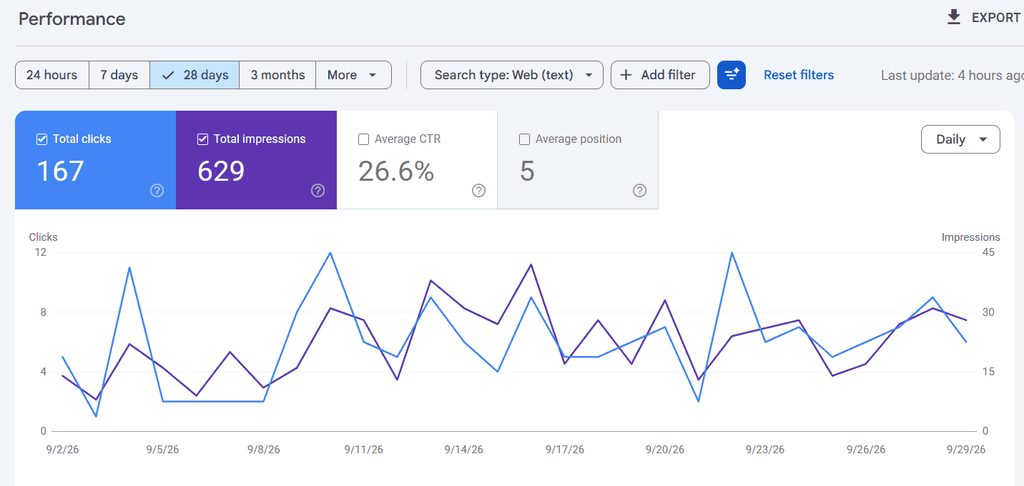
The lesson I took from it: hreflang rarely fails loudly. It just quietly gets ignored, and you only notice when the wrong country’s traffic shows up in your reports.
And one expectation to reset: hreflang doesn’t make a weak page rank. It helps Google swap in the right version of a page that’s already earning its place. Think of it as a traffic cop, not a booster engine.
Mistake 9: Letting Canonical Tags Fight Your Hreflang
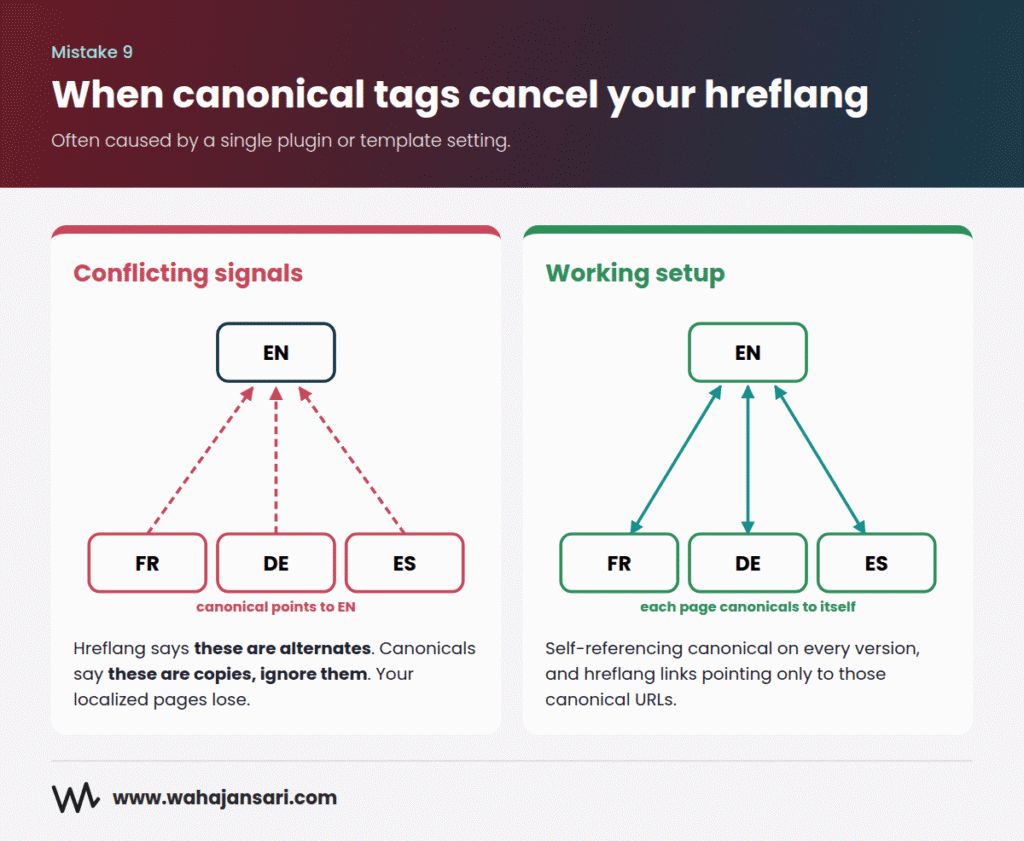
This one is sneaky, and it often hides inside a CMS setting or a plugin default.
Picture this. Your French, German, and Spanish pages all have a canonical tag pointing to the English page. Your hreflang tags say “these are alternate versions.” But your canonicals say “these are just copies of the English page, ignore them.”
Which signal do you think wins? Usually not the one you want.
The fix: Each language or regional version should have a self-referencing canonical (the French page canonicals to itself, the German page to itself). Your hreflang tags should only point to those canonical URLs, never to redirected, noindexed, or non-canonical ones.
When you run a crawl in Screaming Frog or a similar tool, filter for pages where the canonical URL doesn’t match the page URL inside your localized folders. If you find a pattern, it’s almost always a template or plugin setting, which means one fix can solve thousands of pages.
Mistake 10: Auto-Redirecting Visitors by IP or Browser Language
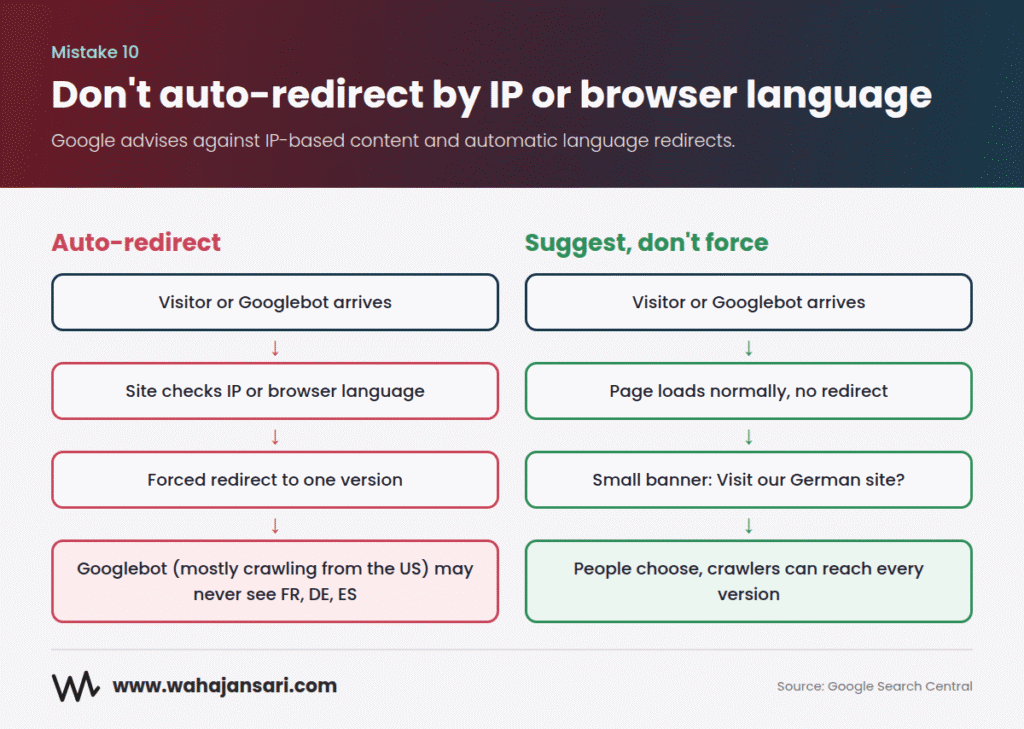
It feels helpful. Someone visits from Germany, you send them straight to /de/. What’s the harm?
Quite a lot, actually.
Google says Googlebot usually crawls from the US and sends requests without setting a language preference. So if your site redirects based on location or browser language, Googlebot may only ever see your US or English version, and your other versions may not get crawled and indexed properly. Google’s documentation is direct about it: don’t use IP analysis to adapt your content, and avoid automatically redirecting users between language versions.
It’s also annoying for real people. An English speaker living in Dubai, a German traveling in Spain, a VPN user. All of them get forced onto a version they didn’t ask for.
What I’d do instead: Show a small, non-intrusive banner that says something like “Looks like you’re in Germany. Visit our German site?” and let people choose. Keep a clear language or country switcher in the header or footer on every page. People stay in control, and crawlers can reach everything.
Mistake 11: Trusting Code Over Content to Signal Language
A lot of people assume the lang attribute in the HTML tells Google what language a page is in. It doesn’t.
Google says it uses the visible content of the page to determine language, and it doesn’t use code-level signals like the lang attribute or the URL for this. That’s why pages that mix languages cause problems. Half-English navigation, a German product description, English reviews, and an English footer? You’re sending mixed signals.
The same goes for translating only the template. If the menu and footer are in Spanish but the main content is still English, Google may show the same content multiple times with different wrapping, which is a bad experience.
The fix: One page, one language, top to bottom. Main content, navigation, buttons, footer, and image alt text.
One small exception worth knowing: Bing works differently. Bing’s own webmaster guidance has pointed site owners to the content-language meta tag as a way to declare language and location. If Bing (or Copilot, which runs on Bing’s index) matters in your market, it’s worth adding alongside hreflang. It costs you one line of code.
Mistake 12: Still Looking for the “Target Country” Setting in Search Console
If you learned international SEO a few years ago, you might remember the International Targeting report in Search Console, where you could pick a target country for your site.
It’s gone. Google deprecated the International Targeting report in 2022, saying country targeting through Search Console was determined to have little value, while it continues to support hreflang.
You’d be surprised how many older guides and audit checklists still tell you to “set your target country in Search Console.” That step no longer exists.
So what replaces it? You earn the signal instead of declaring it. That means:
- A clear URL structure (ccTLD, or a country subfolder with hreflang)
- Local currency, addresses, and phone numbers on the page
- Localized content that actually serves that market
- Links from websites in that country
Which brings us to the next mistake.
Mistake 13: Expecting Your Home Market Authority to Carry Every Country
Your .com has strong backlinks in the US. Great. That doesn’t mean your new /fr/ folder is suddenly trusted by French searchers.
Google lists links from other local sites among the signals it uses to understand a page’s target audience. So if your French pages have zero French links, zero French mentions, and zero French press, you’re asking Google to trust a stranger.
Here’s an easy way to think about it. Your domain authority is like a reputation in your hometown. Move to a new city, and people might have heard of you, but you still need local friends who’ll vouch for you.
What I’d do: Build local links per market. Local industry directories (the real ones, not spam lists), local partners, suppliers and distributors, local press and bloggers, and digital PR in the local language. If you have a physical presence there, set up and maintain your Google Business Profile as well.
Bonus: Measuring Every Market as One Big Number
This isn’t a ranking mistake, but it hides all the others.
If your monthly report says “organic traffic up 12%,” that could mean the US is up 25% and Germany is quietly dying. Blended numbers bury market-level problems.
The fix: In Search Console, filter Performance by country. If you use subfolders, add each country folder as its own URL-prefix property so you get clean, separate reports. In GA4, build a simple comparison or exploration by country and landing page folder. Then review each market on its own.
And here’s one more angle most people forget. AI assistants like ChatGPT, Gemini, and Google’s AI Overviews answer people in their own language. If your localized pages are thin, untranslated, or confusing, I wouldn’t expect AI tools to pick them as a source for local answers either. The same localization work that helps you rank also gives these tools something worth citing.
A Quick International SEO Audit Checklist
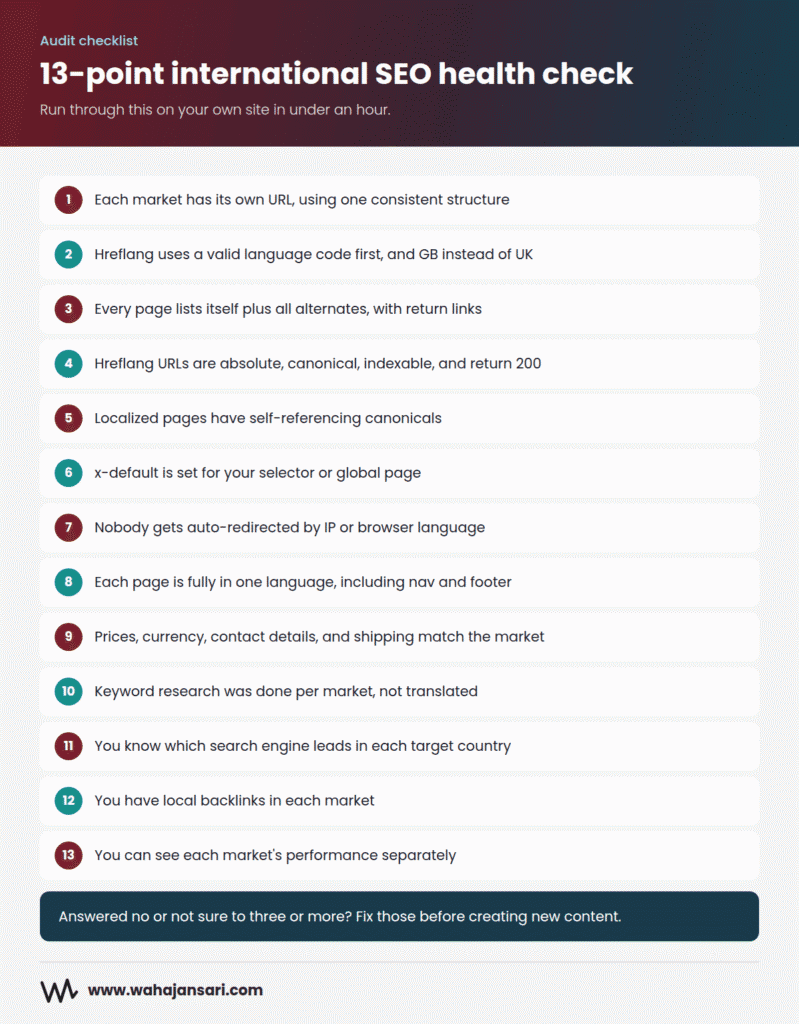
Want to check your own site in under an hour? Run through this:
- Does each market have its own URL, using one consistent structure?
- Do all hreflang codes use a valid language code first, and GB instead of UK?
- Does every page list itself plus all alternates, with return links?
- Are hreflang URLs absolute, canonical, indexable, and returning a 200 status?
- Do localized pages have self-referencing canonicals?
- Is there an x-default for your selector or global page?
- Are you redirecting anyone automatically by IP or browser language?
- Is each page fully in one language, including navigation and footer?
- Do prices, currency, contact details, and shipping info match the market?
- Was keyword research done per market, not translated?
- Do you know which search engine leads in each target country?
- Do you have any local backlinks per market?
- Can you see each market’s performance separately in Search Console and GA4?
If you answered “no” or “not sure” to three or more, start there before creating any new content.
FAQs
Does hreflang improve rankings?
Not directly. Hreflang helps Google show the right language or regional version of a page to the right searcher. It’s a matching tool. If a page isn’t strong enough to rank, hreflang won’t push it up.
Will having the same English content for the US, UK, and Australia get me penalized?
No penalty. But Google may treat near-identical pages as duplicates and choose one to show. Use hreflang plus self-referencing canonicals, and make each version genuinely regional with local prices, shipping, and contact info.
Should I use a ccTLD, subdomain, or subfolder?
For most businesses, subfolders are the simplest and easiest to grow. ccTLDs send the strongest country signal but cost more and need more upkeep. Avoid URL parameters, and avoid mixing structures.
Is AI translation bad for SEO?
AI translation isn’t the problem. Publishing it at scale with no human review is. Use it for a first draft, then have a native speaker edit it and localize the keywords.
Final Thoughts
If you remember just one thing from this post, make it this: international SEO isn’t a translation project. It’s launching in a new market, one that just happens to use your website.
Most of the mistakes above come from the same shortcut. Treating a new country as a copy of the old one. Same keywords, same pages, same links, same reports.
So go slow on purpose. Pick one market. Validate demand. Localize properly. Get the technical setup right once. Earn some local links. Then expand.
It’s less exciting than launching in twelve countries at once. But it’s the version that actually works.
Hope this clears things up.
Discover more from Wahaj Ansari
Subscribe to get the latest posts sent to your email.