
Someone told you internal links are good for SEO, so you added one. Then five more. Now your blog post has a blue word in every second line, a related posts box, a tag cloud, and a footer with 60 links, and you’re quietly wondering if you’ve overdone it.
So, can too many internal links hurt SEO? Yes, but not through a penalty. Too many internal links on a page split the value each link passes, blur which pages matter most to Google, and give readers so many choices that they often click nothing. Google sets no fixed limit, so the real problem is links that don’t help the reader.
Below, I’ll show you what Google actually says about link counts, what normal looks like, and how to check your own pages. And because too few links cause their own mess, we’ll cover that side too.
How Many Internal Links Per Page Is Too Many?
There’s no magic number for when you have too many internal links, and that comes straight from Google. Its documentation on links says there’s no ideal number of links a page should contain, then adds that if you think it’s too much, it probably is. Honestly, that one line beats most link-count formulas you’ll find online.
So what does normal look like? According to the 2025 Web Almanac from HTTP Archive, the median desktop page has 43 links pointing to its own site, and the median mobile page has 39. At the 90th percentile, that jumps to 174 on desktop and 161 on mobile, which the report puts down to the mega menus and dense footers that bigger sites use.
Here’s the thing, though: those numbers count everything, including your menu, footer, and breadcrumbs. The links that cause trouble usually live in the body of the page, where someone is actually trying to read. So instead of chasing one total, split your links into two buckets and judge each one on its own.
| Link type | Where it lives | The question to ask |
|---|---|---|
| Template links | Menu, footer, sidebar, breadcrumbs | Does every page on the site really need this link? |
| Contextual links | Inside your paragraphs | Would a reader want to click this, right here? |
You’ll also see rules like “2 to 5 links per 1,000 words” floating around. Those ranges don’t come from Google. They’re rules of thumb, and they can mislead you in both directions: a long guide that touches 15 related topics can easily earn 15 contextual links, while a short service page might only need two.
What Happens When There Are Too Many Internal Links on a Page
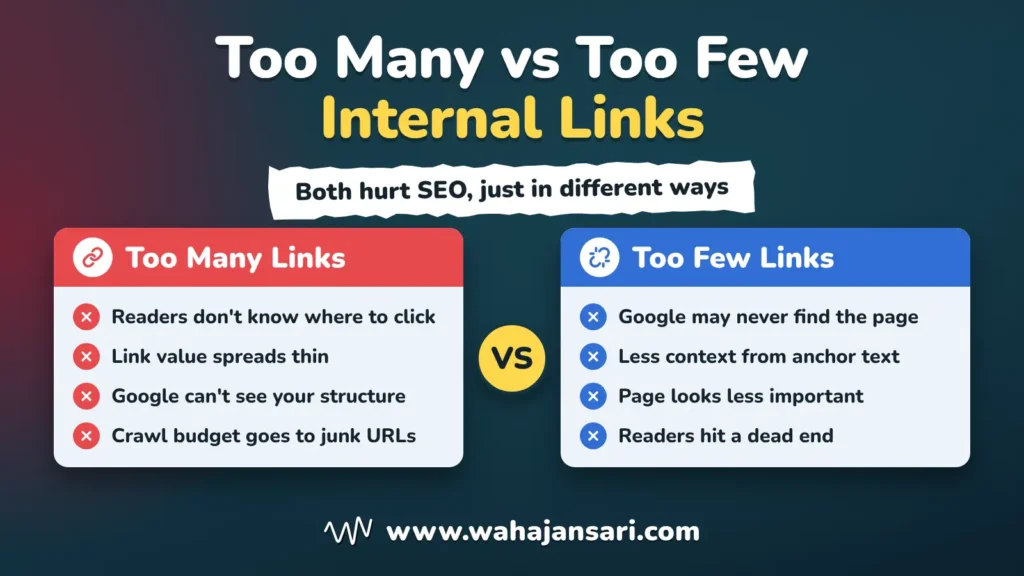
When a page has too many internal links, three things go wrong, and only two of them are about Google. Your readers freeze, your link value gets spread thin, and Google loses track of which pages actually matter. On bigger sites, there’s a fourth cost: crawl budget spent on pages that don’t deserve it.
Your readers don’t know where to go
Here’s my take: when a page is packed with links, users get confused about whether they should click any of them at all. Every blue word becomes a tiny question (should I open this or keep reading?), and after the tenth one, a lot of readers stop answering and just scroll. Or worse, they leave.
UX researchers have a name for this. Hick’s Law, as Nielsen Norman Group explains it, says the more choices you give people, the longer it takes them to decide. Picture a signpost at a crossroads with 40 arrows on it: you don’t feel helped, you feel lost.
Your link value gets spread thin
Every link on a page passes along some of that page’s value, and the more links you add, the smaller each share gets. Matt Cutts, who led Google’s webspam team at the time, explained in a 2009 post that a page with hundreds of links divides its PageRank between all of them. Google has changed a lot since 2009, so don’t treat that as exact math. As a mental model, though, it holds: one link among ten stands out, while one link among 150 barely registers.
Google can’t tell which pages matter
Internal links are how you tell Google which pages you care about most. In a July 2021 Search Central office hours session, Google’s John Mueller was asked whether too many internal links do more harm than good, and he answered “yes and no.” His point was that if every page links to every other page, there’s no real structure left, so Google struggles to understand how your pages relate to each other.
Let me give you an example. Say you run a plumbing site, and every blog post links to all 30 of your service pages in a big block at the bottom. Your drain cleaning page now gets the same push as your faucet repair page and every other service, so none of them stands out. Mueller’s suggestion was a clear hierarchy instead: a main page that links to categories, and categories that link to the individual pages.
Crawl budget goes to the wrong pages
Every link is basically an invitation for Googlebot to crawl another URL. So a page with lots of internal links spends a lot of crawl budget, and in my view, that’s sometimes worth it and sometimes pure waste. If those links point at pages you want ranked, great, Google’s time is well spent. If they point at tag pages, filter combinations, and near-duplicate URLs, you’re paying for crawls that bring nothing back.
Google says this directly in its faceted navigation guide: when crawling is spent on useless URLs, crawlers have less time for new, useful ones. Online stores with size, color, and price filters are the classic victims, because every filter link can create a brand new URL.
Now, to be fair, crawl budget is mostly a big-site problem. Google’s crawl budget guide is written for sites with roughly a million or more pages, or 10,000 or more pages that change daily, and it says sites whose pages get crawled quickly don’t need it. If you run a 40-page service business site, too many internal links won’t wreck your crawl budget. Your real risks are confused readers and blurry signals.
Is There an Internal Link Limit for SEO?
No. Google doesn’t set an internal link limit for SEO, and there’s no penalty just for having too many internal links. Its current documentation only asks you to use judgment, which is Google’s polite way of telling you not to go overboard.
The famous “100 links per page” rule did come from Google, though. Cutts explained in that same 2009 post that it started because Google used to index only about 100KB of a page, and roughly 100 links fit under that, but he also confirmed Google now indexes more than that. Google later dropped the 100-link guideline altogether.
So why does the myth refuse to die? Partly because some site audit tools still flag pages that cross a set link count, and a red warning in a dashboard feels like a penalty even when it isn’t. Treat that kind of excessive internal linking SEO warning as a prompt to look at the page, not a verdict.
One caveat from Cutts’s post still matters: on pages with a huge number of links, Google might not follow every single one. It’s old guidance, but it’s one more reason not to bury your most important link at position 300.
Why Too Few Internal Links Hurt Too
Too few internal links hurt for the opposite reason: Google and your readers can’t find, understand, or reach your pages. This is the side of the internal linking impact on SEO that most people miss. They worry about adding too many internal links and never notice the page that has none.
Here’s my take on the other extreme. When a page has very few internal links, it’s bad for crawlers and users alike, and here’s why:
- Google may never find the page. Google uses links to discover new pages to crawl, and its documentation says every page you care about should have a link from at least one other page on your site. A page with no internal links (an orphan page) depends on your sitemap or outside links to get found.
- Google gets less context. Google uses links as a signal for what a page is about, and your anchor text is part of that signal. Fewer links means fewer chances to tell Google “this page is about emergency AC repair.”
- The page looks less important. If your homepage links to every blog post but not to your best service page, you’re telling Google the blog matters more.
- Readers hit a dead end. Someone finishes your post, has a follow-up question, and the only way forward is the back button. On a service site, that can be a lost lead.
Let me give you an example. You publish a new emergency AC repair page, but nothing on your site links to it: not the homepage, not the services menu, not the five blog posts about broken AC units. Google might find it through your sitemap eventually, but you’ve given it zero context and zero sign that it matters.
How to Tell If a Page Has Too Many Internal Links
The quickest test is to separate template links from body links, then ask whether each body link would make sense to a first-time visitor. You don’t need anything fancy for this, just a site crawler and Google Search Console. Here’s the process I’d follow:
- Crawl the page and count by location. Run any site crawler and split the links into menu, footer, sidebar, and body links. If the body of a short page is carrying dozens of links on its own, that’s your first red flag.
- Look for repeats. Check whether the same URL is linked three or four times from one page. One well-placed link usually does the job better than four.
- Check where the links point. Body links should go to pages you actually want people and Google to see, not to tag archives, filter URLs, redirects, or thin pages.
- Read the page like a stranger. Cutts called this putting on your “user hat.” Open the page on your phone and ask whether the links help you or just get in the way.
- Open the Links report in Search Console. Google’s Links report shows which of your pages get linked the most from within your own site. If tag pages, filter URLs, or old posts sit above your main service pages, your links are pointing Google at the wrong things (footer pages like contact and privacy will always rank high, so don’t panic about those).
Step five is my favorite because it shows the whole site at once, not just one page. It’s also free, which never hurts.
Internal Linking Best Practices That Keep the Balance
Good internal linking best practices come down to one idea: every link should help the reader take a sensible next step. Here’s what that looks like in practice:
- Link where the reader would naturally ask “how?” or “what’s that?” That’s the moment a link actually gets clicked.
- Use descriptive anchor text. Google says good anchor text is descriptive, reasonably concise, and relevant to both the page it’s on and the page it points to. “Click here” tells nobody anything.
- Give every important page at least one link from another page. This comes straight from Google, and it’s the cure for orphan pages.
- Build a hierarchy, not a spider web. Homepage to categories, categories to individual pages, and related pages linking to each other where it genuinely makes sense.
- Keep junk URLs out of your link paths. Filter combinations, endless tag pages, and duplicate versions don’t need links from every page. If you don’t need filter URLs in search, Google’s faceted navigation guide says blocking them in robots.txt is more effective long term than other methods.
- Update old posts when you publish new ones. A new page has no internal links until you add them, so go back to your related posts and link it in.
Notice that none of these says “add five links per post.” That’s on purpose. Once every link has a reason to exist, you won’t end up with too many internal links, because the count mostly takes care of itself.
I came across a common internal linking problem while working on website optimization. The website had too many internal links scattered throughout its blog content. Almost every paragraph contained multiple links, including repeated links to the same URLs and links to pages that weren’t particularly relevant. Although the intention was to improve SEO, the excessive linking was making the content difficult to read and the website structure unnecessarily complicated.
My first step was to identify how internal links were distributed across the website. I used Screaming Frog SEO Spider to crawl the pages and analyze internal link counts, destination URLs, and anchor text. I also reviewed Google Search Console’s Links report to understand which pages were receiving the most internal links and whether important pages were getting sufficient internal linking support.
Based on my analysis, I focused on removing unnecessary links, fixing repetitive anchor text, and prioritizing links to relevant service pages and supporting articles. Instead of linking to every possible page, I focused on creating meaningful connections between related content. I also made sure important pages could be reached through a logical internal linking structure.
The result was a cleaner internal linking strategy that made content easier to navigate and helped establish clearer relationships between related pages. My biggest takeaway was that adding more internal links doesn’t automatically improve SEO. Every internal link should serve a purpose, whether it’s helping users discover relevant information or helping search engines understand the website’s structure.
FAQs
Do navigation and footer links count toward the total?
Yes, Googlebot sees every crawlable link on the page, whether it sits in your menu, your footer, or a paragraph. That said, template links repeat across the whole site, so they rarely cause the clutter problem on a single page. The body content is usually where the overload happens.
How many internal links should a blog post have?
A blog post should have as many internal links as it has genuinely related pages a reader might want next, and no more. A 1,500-word post about fixing a leaking faucet might link to your faucet repair service, a post about low water pressure, and a guide to shutting off your main water valve. If you’re adding links only to hit a target, stop there.
Is it bad to link to the same page more than once?
There’s no rule against it, but it’s usually wasted effort. One clear link with good anchor text does the job, and repeating it three times on one page mostly adds clutter for the reader. The exception is a long guide where the same page is genuinely relevant in two sections far apart.
Should I nofollow internal links to save crawl budget?
For normal pages, no, because you want Google to follow links to the pages you care about. For faceted navigation, Google says nofollow on links to filter URLs may help, but every link to that URL needs it, and robots.txt is generally more effective long term. Most small sites won’t need either.
Final Thoughts
If you take one thing from this post, make it Google’s own line: if you think it’s too much, it probably is. Too many internal links won’t get you penalized, but they will quietly make your pages harder to use and harder for Google to read. Too few do the same damage from the other side.
So here’s what I’d do this week. Pick your three most important pages, check how many internal links point to them in Search Console, then open your busiest blog post and remove every link a reader wouldn’t miss. Hope this clears things up, and I bet the page reads better the moment you hit update.
Discover more from Wahaj Ansari
Subscribe to get the latest posts sent to your email.