
Most site owners can tell you how many backlinks they have. Ask them what those links actually say, and you’ll usually get a blank stare. That’s a problem, because the words people use to link to you tell Google what your page is about, and they can also make your link profile look like you bought it.
So what does an anchor text checker actually do? An anchor text checker pulls the links pointing to a page or a whole domain and lists the clickable words used in each one, with a count for every phrase. That shows you which anchors dominate, whether your profile looks natural, and whether the anchors actually describe the pages they point to.
In this post, I’ll show you how to read an anchor report, the free tool Google already gives you, a simple audit you can run in an hour, and what to do when something looks off. I’ll also share the one rule I follow for every anchor I control. It’s simpler than most people make it.
Free anchor text checker
Check your anchor text distribution
Paste the anchors pointing to one page. You’ll see how they split by type, how many actually describe the page, and what’s worth fixing first. Everything runs in your browser, so nothing you paste is sent anywhere.
1. What are you checking?
2. The page these links point to
3. Your anchors
What an Anchor Text Checker Shows You
A good anchor text checker shows you four things: the anchor text itself, how many links use it, which sites those links come from, and which page on your site they point to. Some tools also show whether each link is dofollow or nofollow. That’s the raw material, and what you do with it is where the actual SEO happens.
Here’s why it matters. Google’s own link best practices say anchor text tells people and Google something about the page being linked to. So the anchors pointing at your pages are basically labels that other people stick on your content.
Think of it like spice jars in a kitchen. If every label just says “spices”, nobody knows what’s inside. If every single label says “premium saffron”, you start to suspect somebody printed the labels themselves. Google reacts the same way, and an anchor report is how you see your labels before Google judges them.
Backlink Anchors vs Internal Anchors: Check Both
Short answer: check both, but fix your internal anchors first. Backlink anchors are chosen by other websites, so you can only influence them. Internal anchors are 100% yours, and you can fix them in an afternoon.
A lot of people run an anchor check on their backlinks, panic about a few spammy phrases, and never look at their own internal links. That’s backwards, because your own site is the one place where every anchor is under your control. A proper website anchor text analysis covers your backlinks, your internal links, and how the two compare for each important page.
Let me give you an example. Say you run a dental clinic in Sterling and your teeth whitening page has 12 backlinks, mostly branded. Internally, though, 30 blog posts link to it with “click here” or “learn more”. Those 30 links are wasted context you could fix today without emailing anyone.
The Anchor Text Types You’ll See in Your Report
Every anchor in your report falls into one of a handful of types, and no, you don’t need to memorize them. Here’s how each one looks for that same teeth whitening page, owned by a made-up clinic called BrightSmile Dental:
| Anchor type | Example | What it tells you |
|---|---|---|
| Exact match | teeth whitening in Sterling | Strongest topic signal, but risky when overused |
| Partial match or variation | professional teeth whitening, whitening treatment in Sterling | Relevant and natural, the sweet spot for most links |
| Branded | BrightSmile Dental | Looks natural and builds trust in the brand |
| Naked URL | brightsmile.pk/teeth-whitening | Neutral, shows up when people paste the link as is |
| Generic | click here, read more, this page | Gives Google almost no context |
| Image link | the image’s alt text | Google treats the alt text as the anchor |
| Empty | (empty) | An image link with no alt text, so zero context |
Google’s guidance confirms that for image links, it uses the image’s alt text as the anchor text. So if your logo links to your homepage with no alt text, that link carries no label at all, which makes it the easiest fix in this entire post. In Search Console, links like that show up as “(empty)” in the anchor list.
What Should Your Anchor Text Say? My Rule
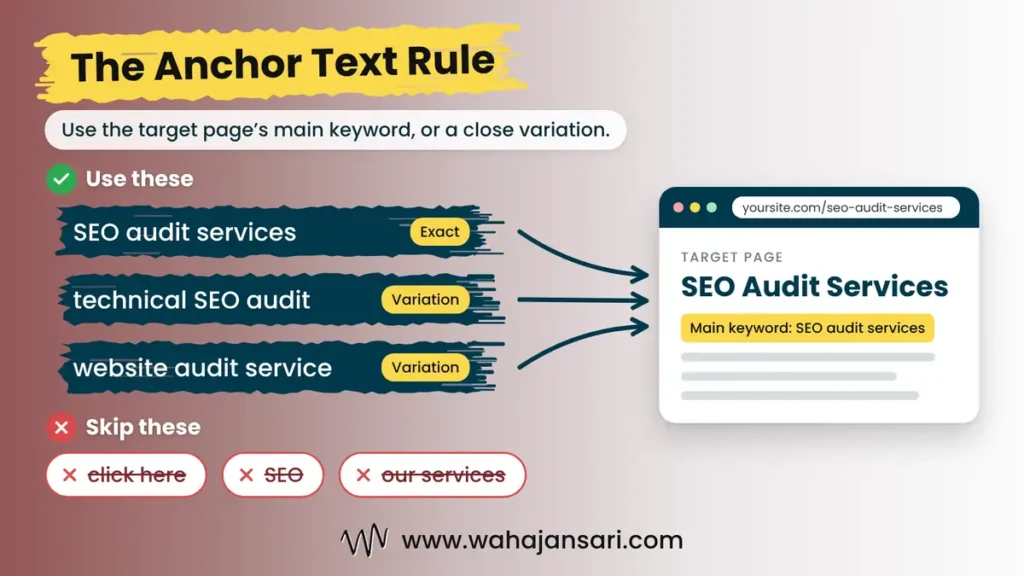
My rule is simple: anchor text should be the main keyword of the page it points to, or a close variation of it. If the target page is built around “SEO audit services”, the anchor should say that, or something like “technical SEO audit” or “website audit service”. It shouldn’t say “SEO”, “our services”, or “click here”.
This lines up with what Google asks for. Its link best practices describe good anchor text as descriptive, reasonably concise, and relevant to both the page it sits on and the page it links to. The target page’s keyword is the most relevant description you’ll ever find for that page.
Now notice the word “variation” in my rule. That’s the part people skip. Using the exact keyword on every link is how you end up with a profile that looks printed, so mix the exact keyword with natural variations, especially on backlinks you place yourself.
A client approached me because some of their important service pages were not performing as expected in search results. While reviewing the website, I noticed that many internal links were using generic anchor texts such as “click here”, “read more”, and “learn more”. Although the website had plenty of internal links, they weren’t providing enough context about the pages they were pointing to.
I took responsibility for auditing the website’s internal and external anchor text distribution. I started by using Google Search Console to review backlink anchor texts and a website crawler to export internal links. I also used Ahrefs to examine the backlink profiles of competing websites. After collecting the data, I organized the anchors into different categories, including exact match, partial match, branded, generic, and naked URL.
The next step was matching each anchor text with its destination page and primary keyword. I identified generic anchors, irrelevant variations, and cases where similar anchor texts were pointing to different pages. I then replaced unnecessary generic anchors with descriptive, keyword-relevant variations while keeping the wording natural. I avoided repeating exact-match keywords everywhere because my goal was to improve relevance, not over-optimize the website.
This gave the client a much clearer internal linking structure and made the relationship between important pages easier to understand. It also provided a better foundation for future SEO optimization. My biggest takeaway was that having hundreds of internal links doesn’t necessarily mean you’re doing internal linking correctly. The anchor text and the destination page need to make sense together.
How to Check Anchor Text Distribution Step by Step
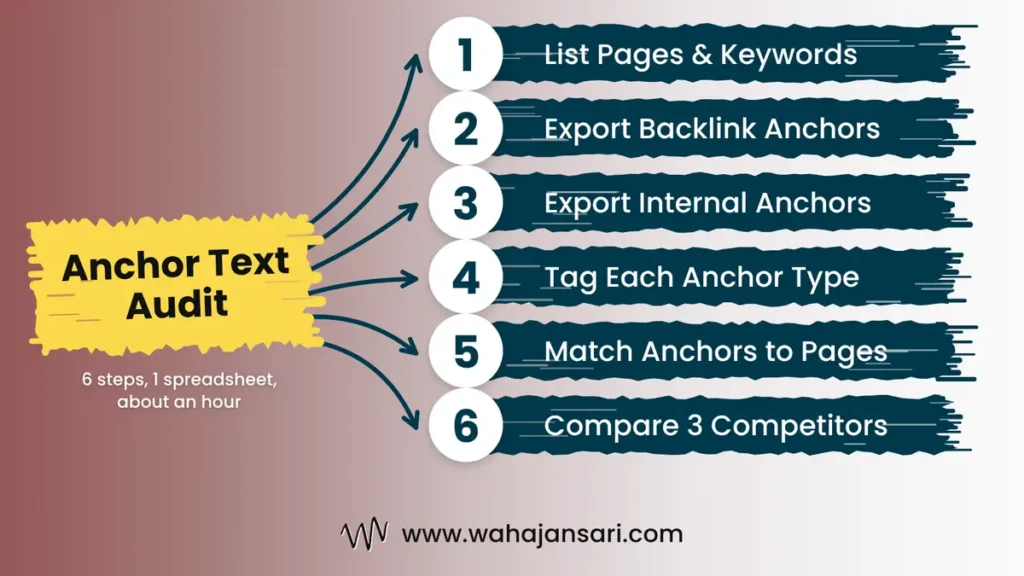
You don’t need a fancy setup to check anchor text distribution properly. You need a spreadsheet, about an hour, and these six steps:
- List your important pages and their keywords. Write down each money page, its main keyword, and two or three variations. This is your answer key.
- Export your backlink anchors. Use Search Console (covered next) or a paid backlink tool, and export the anchor, the linking site, and the target page.
- Export your internal anchors. Crawl your site with a desktop crawler and export every internal link with its anchor text and destination URL.
- Tag each anchor by type. Add a column and mark each one as exact, variation, branded, naked URL, generic, or image.
- Match anchors to target pages. For each page, check whether its anchors use its keyword or a variation. Anything that describes a different topic gets flagged.
- Compare with three competitors. Run the same check on pages ranking in the top five for your keyword and see what their mix looks like.
Step 5 is the one almost nobody does, and honestly, it’s the most useful. A report full of nice keyword anchors means nothing if those anchors point at the wrong page. Picture 20 links saying “teeth whitening in Sterling” all pointing at your homepage while the actual whitening page sits there with none.
Use Google Search Console as a Free Backlink Anchor Text Checker
If you only use one backlink anchor text checker, make it Search Console, because it’s free and the data comes straight from Google. Chances are you already have it set up and have simply never opened this report. Go to Links, then External links, then Top linking text, and you’ll see the most common words other sites use when they link to you, sorted by count.
A few things to know before you trust it blindly. According to Google’s Links report documentation, the table only counts links from outside your property, and it groups text by exact match without caring about capital letters. So “Teeth Whitening” and “teeth whitening” land in one row, but “teeth whitening” and “teeth whitening Sterling” are two separate rows.
The same page says the report shows a sample, tables cap at 1,000 rows, and it isn’t a complete list of every link to your site. It also won’t sort anchors into types or warn you about risk. Think of it as Google handing you the raw receipts, not doing your accounting.
Picking an Anchor Text Analysis Tool: Free vs Paid
The right anchor text analysis tool depends on what you’re checking and whose site it is. Search Console only works for sites you’ve verified, so you’ll need something else for competitors and for internal links. Here’s how the options compare:
| Tool type | Best for | Watch out for |
|---|---|---|
| Google Search Console | Your own backlink anchors, for free | Sampled data, no anchor types, your sites only |
| Free anchor text checker online | A quick look at any domain, including competitors | Many only analyze a sample of links |
| Paid backlink tool with an anchor report | Full anchor distribution, filters, competitor comparisons | Monthly cost, and every tool’s index is different |
| Desktop crawler | Every internal anchor on your site | Needs setup, and big sites take a while to crawl |
My take: for a small site, Search Console plus a crawler covers most of what you need. Add a free anchor text checker online when you want a peek at a competitor. Pay for a full anchor text analyzer only when you’re actively building links or cleaning up a messy profile, because that’s when the extra data pays for itself.
One warning about comparing tools. Different tools crawl different parts of the web, so the same domain can show very different anchor numbers in two of them. Don’t panic over one tool’s percentages; look for patterns that show up everywhere.
Red Flags to Look For in Your Anchor Report
Most reports from an anchor text checker look boring, and boring is good. You’re scanning for patterns that look built rather than earned. These are the ones I’d look into first:
- One commercial phrase dominates your backlinks. If “best teeth whitening Sterling” is your top anchor and your brand name is nowhere near it, that’s not how people naturally link.
- Keyword anchors from guest posts, press releases, or widgets. Google’s spam policies list links with optimized anchor text in articles, guest posts, or press releases distributed on other sites as link spam.
- Sitewide footer or template links with keyword anchors. The same policy calls out links spread through footers and templates across many sites.
- A sudden cluster of exact match anchors from sites you don’t recognize. That’s worth a closer look, even if you didn’t build those links.
- Generic anchors all over your internal links. Google says text like “click here” or “read more” gives readers and Google very little context.
- The same anchor pointing at two different pages. If “teeth whitening” links to both your service page and a blog post, you’re telling Google two pages are about the same thing.
Notice what’s not on this list: a magic percentage. Google doesn’t publish an ideal anchor ratio anywhere in its documentation, and the numbers floating around come from correlation studies and personal rules of thumb. Your competitors’ profiles are a far better benchmark than a random 30% figure from somebody’s blog.
How to Fix Anchor Text Problems You Find
Fix what you control first, then work outward. Internal anchors are the easy win: open the post, change “click here” to the target page’s keyword or a variation, and hit update. You can clean up an entire blog’s internal anchors in a weekend.
For backlinks you placed yourself, like guest posts or partner pages, email the site owner and ask them to swap the anchor for your brand name or a natural variation. Most will say yes if you keep it short and polite. For links you never built, don’t rush to clean them up.
Here’s why. Since Google made Penguin part of its core algorithm in September 2016, it devalues spam by adjusting rankings based on spam signals instead of hitting the whole site. In plain English, Google can usually discount junk links without your help.
Google’s disavow documentation backs this up. It recommends disavowing only when you have a considerable number of spammy, artificial, or low-quality links and they’ve caused, or likely will cause, a manual action. If neither is true, leave the disavow tool alone and spend that energy earning better links.
FAQs
How often should you check your anchor text?
For most small sites, once every three months is enough. If you’re actively building links or just finished a campaign, check monthly so a bad pattern doesn’t sneak up on you. Also run a check after any sudden ranking drop on a page that relies on backlinks.
Is exact match anchor text bad for SEO?
No, exact match anchor text isn’t bad by itself. It’s the clearest signal of what a page is about, and it’s perfectly normal in internal links. The risk comes when the same exact phrase shows up across many backlinks you placed, because that’s the pattern Google’s spam policies describe.
Can I check a competitor’s anchor text?
Yes, you can check a competitor’s anchor text with a free online checker or a paid backlink tool, since both let you enter any domain. Search Console won’t help here because it only shows data for sites you’ve verified. Comparing three or four competitors who rank for your keyword gives you a realistic picture of what’s normal in your niche.
Is an anchor text analyzer different from an anchor text checker?
Mostly, it’s the same thing wearing a different name tag. Some tools labeled as an anchor text analyzer go a step further and sort anchors into types or flag over-optimization, while a basic anchor text checker just lists anchors and counts. Check the feature list rather than the name.
Final Thoughts
An anchor text checker won’t rank your site for you. What it does is show you the labels the web has stuck on your pages, so you can fix the ones you control and stop worrying about the ones you don’t.
If you remember one thing, make it this: every anchor you write should be the main keyword of the target page or a variation of it, and you should mix the two. Check your internal links first, use Search Console for your backlinks, and compare against real competitors instead of chasing a magic ratio. Do that every few months and anchor text stops being scary. It just becomes another boring checklist item, which is exactly what you want.
Discover more from Wahaj Ansari
Subscribe to get the latest posts sent to your email.