
Here’s a situation I see all the time. Someone spends three months building links, gets a few guest posts live, earns a mention on a nice industry site… and then never checks on any of it again.
Six months later, half those links are gone, nobody noticed, and rankings are slipping for “no reason”.
That’s why this post exists. I’m going to walk you through the essential tools for monitoring off-page SEO, what each one is actually good for, where each one lies to you a little, and a simple routine so you’re not opening seven dashboards every morning.
Quick warning: this isn’t a list of 24 tools. You don’t need 24 tools. You need a few that cover the right signals.
Build your off-page SEO monitoring plan
Answer five questions and get the tools you actually need, what each one covers, and a routine you can stick to.
First, What Are You Actually Monitoring?
Think about a shop in a busy bazaar. The owner can make the shop look perfect inside (that’s your on-page SEO). But his real reputation lives outside: what other shopkeepers say about him, who sends customers his way, what people say over chai at the corner.
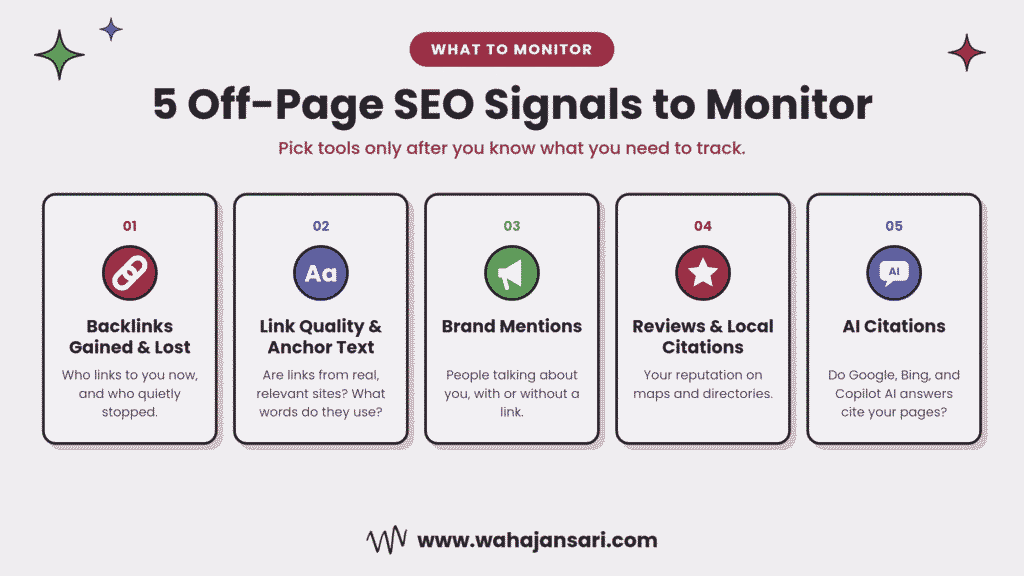
Off-page SEO is that outside reputation. And monitoring it means keeping an ear on five things:
- Backlinks gained and lost. Who links to you now, and who quietly stopped.
- Link quality and anchor text. Whether those links come from real, relevant sites, and what words they use to describe you.
- Brand mentions. People talking about you, with or without a link.
- Reviews and local citations. Especially if you’re a local business.
- AI citations. Whether AI answers in Google, Bing, and Copilot are pulling from your pages.
Most guides stop at number three. In 2026, skipping number five is like checking your shop’s footfall but ignoring the people asking about you on WhatsApp.
The Short Answer
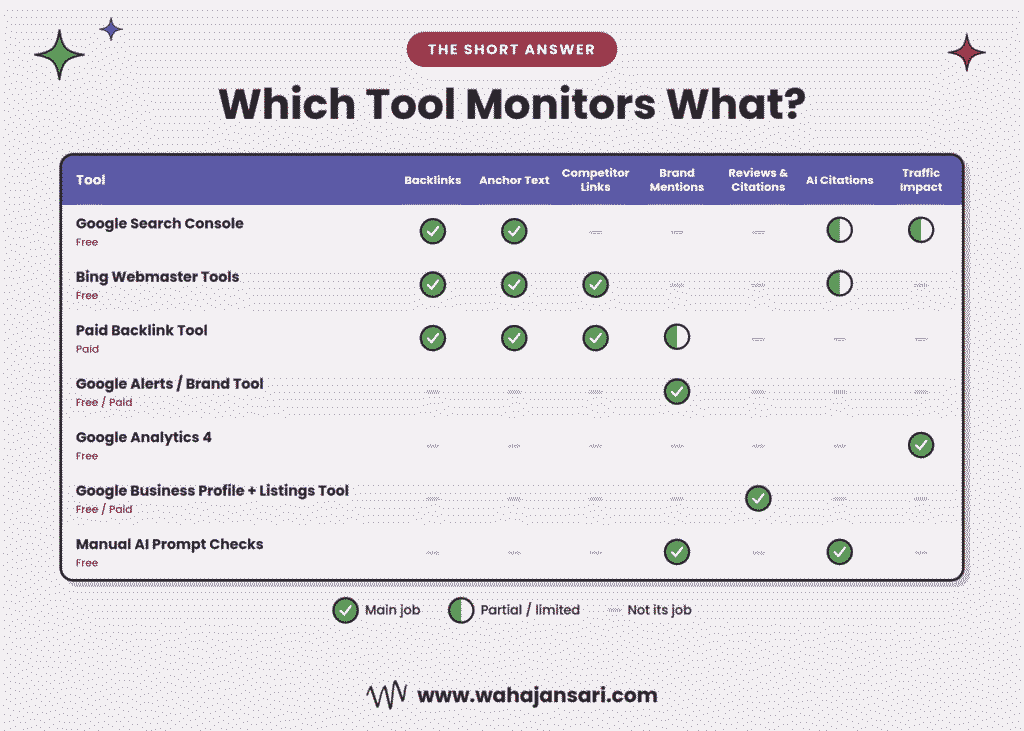
If you just want the list: the essential tools for monitoring off-page SEO are Google Search Console (backlinks Google knows about), Bing Webmaster Tools (free backlink and competitor data plus AI citations), one paid backlink tool like Ahrefs or Semrush (new and lost link alerts), Google Alerts or a brand monitoring tool (mentions), Google Analytics 4 (referral traffic), and a local listings tool if you serve a local area.
My Experience: The Day One Tool Almost Made Me Look Silly
A while back, a client messaged me at 11 PM with a screenshot and three crying emojis. His paid backlink tool showed 27 lost links in one week. He was sure someone had launched a negative SEO attack on his little furniture store.
I opened Search Console. Calm as a Sunday morning. Most of those “lost” links were still listed, sitting there like nothing happened.
So now I had two tools telling me two different stories. One was screaming fire, the other was sipping chai.
I checked the pages manually. Turns out a big home décor blog had redesigned its site, and the tool’s crawler hadn’t revisited the new URLs yet. The links were alive. Only the tool’s memory was outdated.
But here’s the funny part. While I was digging, I opened Bing’s Similar sites view to compare him with his biggest competitor. That’s where I found the real problem: the competitor was getting links from six local interior design blogs that had never even heard of my client.
So the “attack” was a false alarm, and the actual issue was one nobody was looking at.
That’s when it clicked for me. No single tool gives you the full picture. I now pull lost link alerts from one tool, confirm them in Search Console, check competitor gaps in Bing, and only then send that scary midnight message to a client. Or better, I don’t send it at all.
Now let’s break down what each one does well, and where it falls short.
1. Google Search Console: Free, Official, and Not the Whole Picture
Start here. Always.
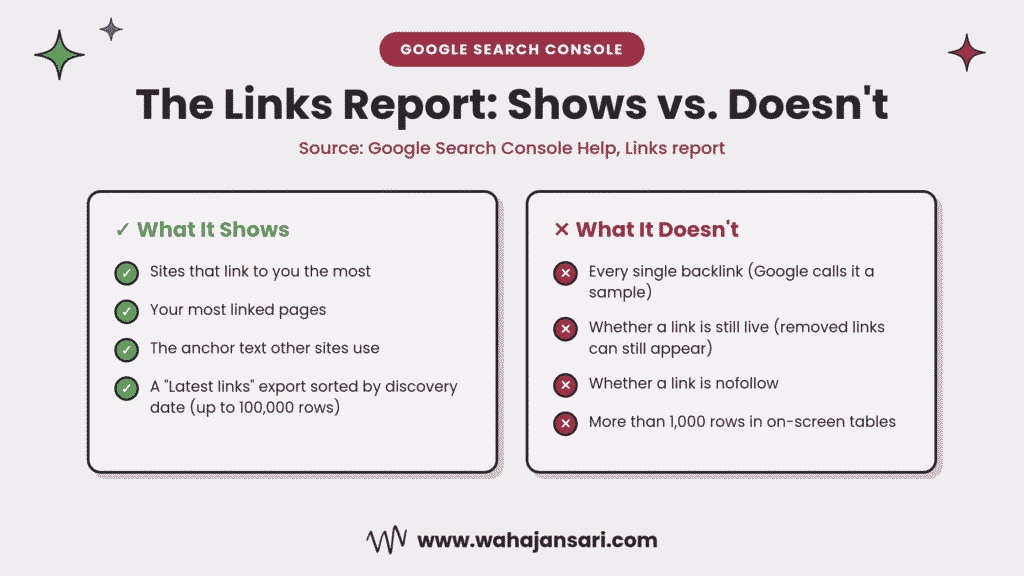
Search Console’s Links report shows the sites linking to you most, your most linked pages, and the anchor text other sites use. It’s free and it comes straight from Google, which is why most people treat it as gospel.
Here’s the thing though. Google’s own documentation says the Links report is a sample, not a complete list of every link. A few other details most people miss:
- Tables are capped at 1,000 rows, so bigger sites will see a truncated view.
- The export goes up to 100,000 rows, and the “Latest links” export is sorted by discovery date. This is the most useful button in the whole report.
- The report can include links that have since been removed, and it doesn’t tell you whether a link is nofollow.
So Search Console tells you what Google has seen. It doesn’t tell you what’s live today.
How I’d use it: once a month, export “Latest links”, sort by date, and scan what’s new. Then open Top linking text. If you see weird anchors like casino keywords or random foreign phrases on a plumbing website, you’ve got something to investigate.
A word on the disavow tool
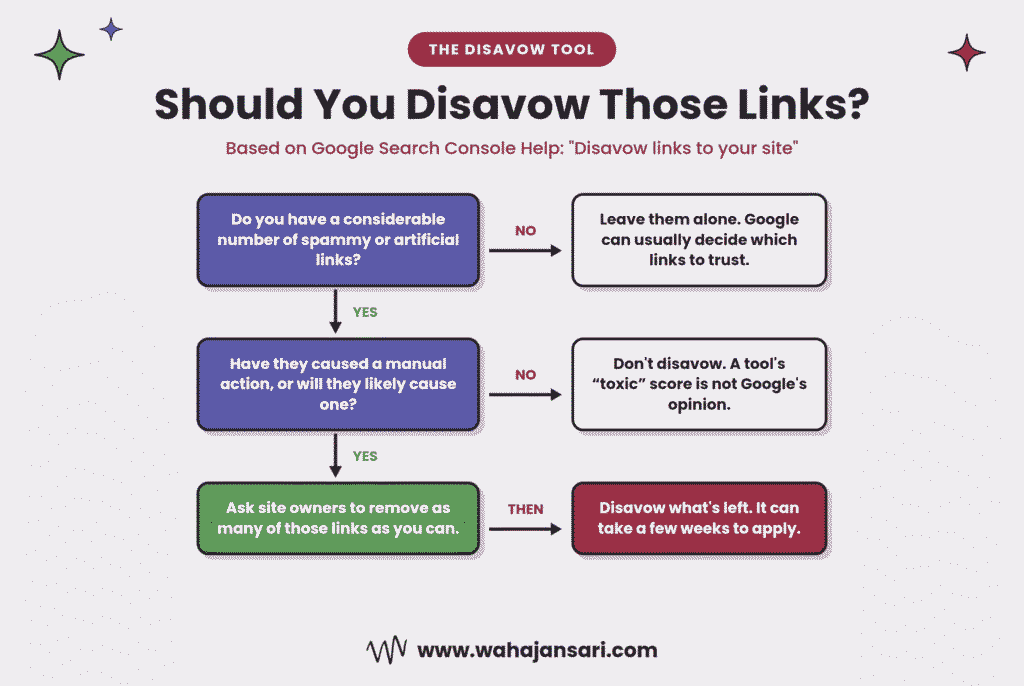
You’ll find a disavow link tool attached to Search Console, and a lot of people get trigger happy with it. Please don’t.
Google says that most sites will not need to use it. It recommends disavowing only when you have a considerable number of spammy or artificial links and they’ve caused, or will likely cause, a manual action. Google also warns that using it incorrectly can hurt your performance in search.
So if a tool flags 40 “toxic” links and you have no manual action and no history of buying links? Honestly, I’d leave them alone. Google is usually already ignoring that junk.
2. Bing Webmaster Tools: The Free Tool Nobody Opens
I’ll be honest, most people set up Bing Webmaster Tools once and forget the password. That’s a mistake, because it does two things Search Console can’t.
First, competitor backlinks for free. Bing’s backlinks section has a “Similar sites” view that lets you compare your backlink profile against other sites, including sites you don’t own. That means you can see which domains link to a competitor but not to you. That’s a free link gap report, sitting right there.
It’s a representative set of links, not every single one. But for a small business that can’t afford a paid tool yet, this is gold.
Second, AI citation data. In February 2026, Microsoft launched AI Performance in Bing Webmaster Tools as a public preview. It shows when your site is cited in Microsoft Copilot, AI-generated summaries in Bing, and select partner integrations, along with which pages are cited and the grounding queries behind them.
It doesn’t show clicks, so don’t confuse citations with traffic. But it’s real, first-party data on whether AI answers trust your content. More on that in a minute.
Setup tip: you can import your sites from Search Console, so this takes a couple of minutes. No excuse.
3. One Paid Backlink Tool (Just One)
Free tools tell you what search engines want to share. A paid backlink index tells you what’s happening, faster and in more detail.
The usual options are Ahrefs, Semrush, Majestic, and Moz. Each runs its own crawler and its own index, so their numbers will never match each other, and that’s fine.
What you actually need from whichever one you pick:
- New and lost link alerts by email, so you hear about a lost link in days, not months.
- Referring domains over time. A healthy site grows this steadily. A sudden spike of hundreds of domains in a week deserves a closer look.
- Anchor text distribution. Mostly branded and natural anchors is what you want. A wall of exact-match keywords is a red flag.
- Competitor comparison, so you can see who links to them and not to you.
Here’s my stance: pick one and learn it properly. I’ve seen people pay for three tools and use none of them well. Switching between three different “authority scores” just gives you three different reasons to worry.
And remember, metrics like DR, DA, and Authority Score are made by tool companies. Google doesn’t use them. They’re useful for comparing sites quickly, not for judging whether a link is good. A relevant link from a small local news site can do more for a dental clinic than a “DR 80” link from a random guest post farm.
4. Brand Mention Monitoring: Google Alerts and Beyond
Not every win comes with a link. Sometimes a blogger mentions your business, or a journalist quotes you, and just… forgets to link.
Those unlinked mentions are some of the easiest links you’ll ever get. The person already likes you. You’re just asking them to finish the job.
Free option: Google Alerts. Set alerts for your brand name, your founder’s name, your product names, and common misspellings. Put your brand in quotes so you don’t get flooded. It won’t catch everything, but it costs nothing.
Paid option: a dedicated listening tool like Brand24, Mention, or Brandwatch catches far more, including social posts, forums, and smaller blogs, with sentiment and alerts.
What to do with a mention:
- Check if it already links to you. If yes, great, log it.
- If not, send a short, friendly note thanking them and asking if they’d add a link to the relevant page.
- If the mention is negative, that’s not an SEO problem first. That’s a customer problem. Fix that first.
Let me give you an example. Say you run a home bakery in Karachi and a food blogger writes “the best cupcakes I had this month came from [your bakery]”. No link. A two-line message plus a thank you can turn that into a relevant, local, editorial link. You can’t buy that kind of link at any price.
5. AI Citation Tracking: The Part Everyone’s Ignoring
This is the gap in almost every off-page SEO tools list I’ve read, and it’s the part that changed the most this year.
People now ask ChatGPT, Gemini, Perplexity, and Copilot for recommendations. If AI answers keep citing your competitors and never you, you’re losing visibility that never shows up as a “ranking”.
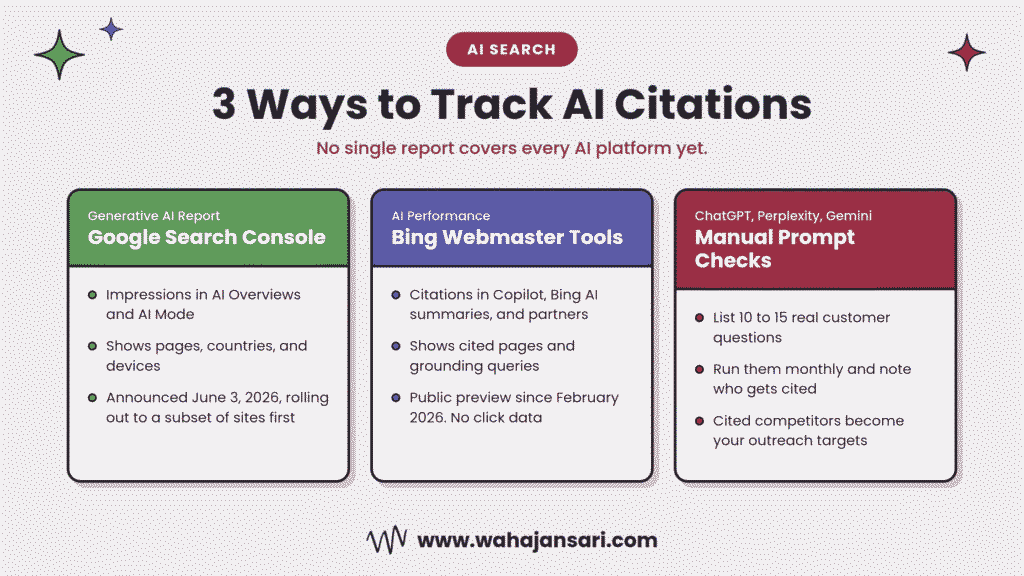
Two first-party reports exist now:
- Bing Webmaster Tools AI Performance (covered above) shows citations across Copilot and Bing’s AI summaries.
- Google Search Console’s Generative AI reports. On June 3, 2026, Google announced new Search Generative AI performance reports that show impressions in features like AI Overviews and AI Mode, plus the pages, countries, and devices involved. Google says it’s rolling these out to a subset of websites first, so don’t panic if you can’t see it yet.
Neither report covers ChatGPT or Perplexity. For those, you’ve got two options: paid AI visibility trackers (a whole new category of tools), or a simple manual check.
My manual method: make a list of 10 to 15 questions your customers actually ask. Once a month, run them in ChatGPT, Perplexity, and Gemini, and note whether your brand is mentioned or cited, and who is mentioned instead. It’s boring. It’s also free, and it tells you exactly which sites the AI trusts in your niche. Those sites are your next outreach targets.
[Wahaj: add your experience here if you’ve tracked AI citations for a client]
6. Google Analytics 4: Proving Any of This Worked
Here’s an uncomfortable question: if a link sends zero visitors and doesn’t move a single ranking, was it worth it?
Monitoring links is half the job. GA4 tells you whether those links do anything.
Two places to look:
- Referral traffic. In GA4, check the traffic acquisition report and filter by session source to see which sites send real visitors. A link that sends 50 visitors a month from a relevant site is worth more than ten that send nothing.
- Branded search growth. This one lives in Search Console, not GA4. Filter your Performance report for queries containing your brand name. When off-page work (PR, mentions, guest content) is working, more people search for you by name. That’s the clearest sign your reputation is growing outside your website.
7. Local Listings and Reviews (If You’re a Local Business)
If you’re a clinic, a restaurant, a real estate agency, or anyone serving a local area, reviews and citations are off-page SEO too.
Your Google Business Profile shows your reviews and lets you reply, so check it weekly. For citations (your name, address, and phone across directories), a tool like BrightLocal or Moz Local helps you spot inconsistent listings. A wrong phone number on five directories is the kind of small mess that confuses both customers and search engines.
And don’t forget Bing Places for Business. Microsoft specifically recommends keeping it updated so your details stay accurate in AI-generated answers.
If you’re not local, skip this section and move on. No guilt.
A Simple Off-Page SEO Monitoring Routine
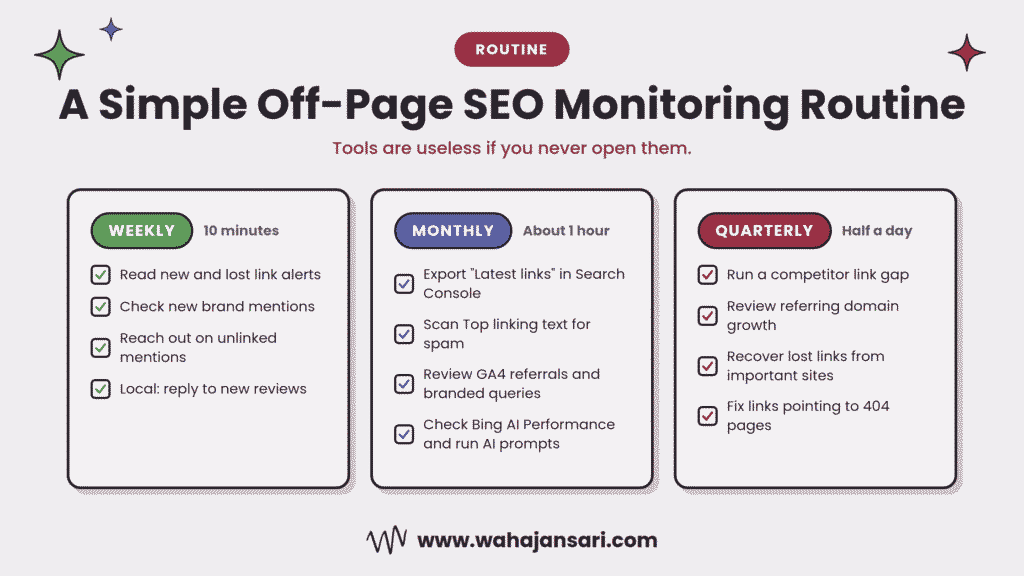
Tools are useless if you never open them. So here’s a routine that takes very little time:
Weekly (10 minutes)
- Read your new and lost link alerts from your paid tool.
- Check Google Alerts or your mention tool for new mentions. Reach out on any unlinked ones.
- Local businesses: reply to new reviews.
Monthly (about an hour)
- Export “Latest links” from Search Console and scan for anything strange.
- Check Top linking text for spammy anchors.
- Review referral traffic in GA4 and branded queries in Search Console.
- Check AI Performance in Bing and the Generative AI report in Search Console (if you have access).
- Run your 10 to 15 AI prompts manually.
Quarterly (half a day)
- Run a competitor link gap in Bing’s Similar sites view or your paid tool.
- Review referring domain growth over the quarter.
- Look at lost links from important sites and try to recover them, especially if a page moved and the link now hits a 404.
That’s it. Not glamorous, but this beats a fancy dashboard nobody looks at.
Your Tool Stack, Based on Budget
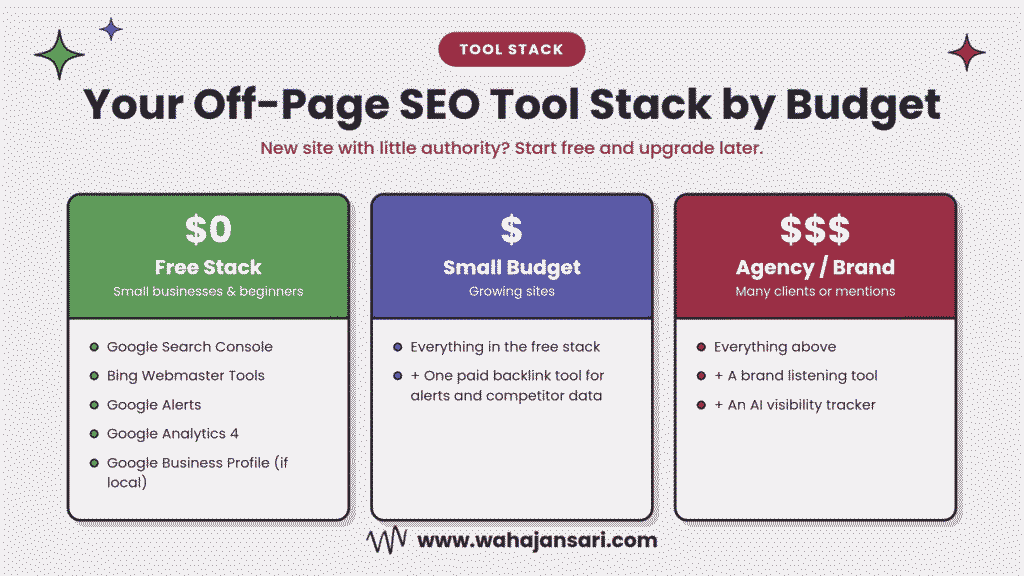
The free stack (perfect for small businesses and beginners): Google Search Console, Bing Webmaster Tools, Google Alerts, GA4, and Google Business Profile if you’re local. Honestly, this covers 70% of what most small sites need. Use Bing’s Similar sites view as your free competitor tool.
The small budget stack: everything above, plus one paid backlink tool for alerts and competitor data.
The agency or growing brand stack: add a proper brand listening tool and an AI visibility tracker on top. At this level, you’re tracking enough clients or mentions that manual checks start eating your week.
If your site is new and has little authority, don’t buy anything yet. Start with the free stack, build some links, and upgrade when you have enough data to make a paid tool worth it.
Mistakes I See People Make When Monitoring Off-Page SEO
Panicking over every lost link. Links come and go. Sites redesign, pages get deleted. Focus on lost links from sites that actually mattered.
Disavowing everything a tool calls “toxic”. We covered this. Toxic scores are a tool’s opinion, not Google’s. Don’t disavow without a real reason.
Treating authority scores as the truth. They’re third-party estimates. Relevance beats a big number.
Assuming Search Console shows everything. It shows a sample. Use it alongside at least one other source.
Tracking without acting. If a report never leads to an outreach email, a fix, or a decision, it’s just a nice chart.
FAQs
Can I monitor off-page SEO for free?
Yes. Google Search Console, Bing Webmaster Tools, Google Alerts, and GA4 together cover backlinks, competitor links, mentions, referral traffic, and some AI citations at zero cost. A paid tool adds faster alerts and bigger link data, but you can start without one.
Does Google Search Console show all my backlinks?
No. Google describes the Links report as a sample of your links, and it can include links that have since been removed. Treat it as a reliable view of what Google has seen, not a complete, live list.
How often should I check my backlinks?
Check alerts weekly and do a deeper review monthly. Quarterly, run a competitor link gap and look at overall growth. Checking daily mostly creates anxiety, not insights.
Should I disavow links that my SEO tool marks as toxic?
Usually not. Google recommends disavowing only when you have a lot of spammy or artificial links and they’ve caused, or likely will cause, a manual action. For most sites, Google already ignores low-quality links.
How do I check if AI tools are citing my website?
Use Bing Webmaster Tools AI Performance for Copilot and Bing AI summaries, and Search Console’s Generative AI report for AI Overviews and AI Mode if your site has access. For ChatGPT and Perplexity, test your customers’ real questions manually or use a paid AI visibility tracker.
Final Thoughts
Off-page SEO isn’t “build links and pray”. It’s build, check, fix, repeat.
If you’re a beginner, please don’t start by buying tools. Set up Search Console and Bing Webmaster Tools today, add a couple of Google Alerts, and follow the monthly routine for three months. You’ll learn more about your site’s reputation from that than from any premium dashboard.
And keep one eye on AI citations. Today they’re a small report in Bing and a rolling-out report in Search Console. A year from now, I think they’ll be one of the first things clients ask about.
Hope this clears things up. Now go check who’s been talking about you.
Discover more from Wahaj Ansari
Subscribe to get the latest posts sent to your email.