
You finally hit page one. Traffic starts coming in. You check your inbox twice a day, waiting for the leads to roll in.
Nothing.
Or maybe it’s the opposite. Your website reads beautifully, your friends say it looks “very professional”, and Google acts like it doesn’t exist.
Both problems have the same fix: SEO friendly copy. That’s copy written so Google understands what your page is about, and so the person who lands on it actually wants to call you, buy from you, or fill out that form.
Below, I’ll show you where keywords go, why brand voice and authority matter more than most guides admit, how to write headings that sell, and how to keep text simple without making it thin. Plus a full before-and-after example and a checklist for your next page.
What SEO Friendly Copy Really Means
SEO friendly copy is website text that does two jobs at once. It helps search engines understand what the page is about and which searches it deserves to show up for. And it convinces the human reading it to take the next step. If your copy only does one of those jobs, it isn’t finished.
I like to think of it this way. Imagine a restaurant on the busiest food street in Sterling, VA. Great location, crowds walking past all day. That’s what ranking gives you.
But the menu is half jargon, has no prices, and doesn’t tell you what the house special is. So people glance at it and walk to the next shop. The location got them to the door. The menu was supposed to get them to order.
SEO is your location. Copy is your menu. You need both.
Here’s where most people go wrong: they treat “SEO friendly” as a layer you sprinkle on at the end. Write the page, then push the keyword in five more times. That’s not SEO friendly copy. That’s normal copy with a keyword problem.
Start With Search Intent, Not the Keyword
Before you write a single line, ask yourself one question: what does the person typing this keyword actually want?
Let me give you an example. Someone searching “what is SEO” wants a simple explanation. Someone searching “SEO services for dentists” wants to hire somebody. Same topic, completely different pages.
Put a sales page in front of the first person, and they’ll leave. Give a beginner’s guide to the second person, and they’ll leave too, straight into your competitor’s contact form.
The easiest way to check intent? Google the keyword and look at what’s ranking. Guides? Service pages? Product pages? Comparison lists? Google is basically showing you what it thinks searchers want. Match that format, then do it better.
Honestly, this is the step that decides whether everything else pays off. Great copy on the wrong type of page is still the wrong page.
Where Your Keywords Should Go (and Where They Shouldn’t)
So you know the intent, and you’ve picked your keyword. Now let’s put it to work without making the page sound like a robot wrote it.
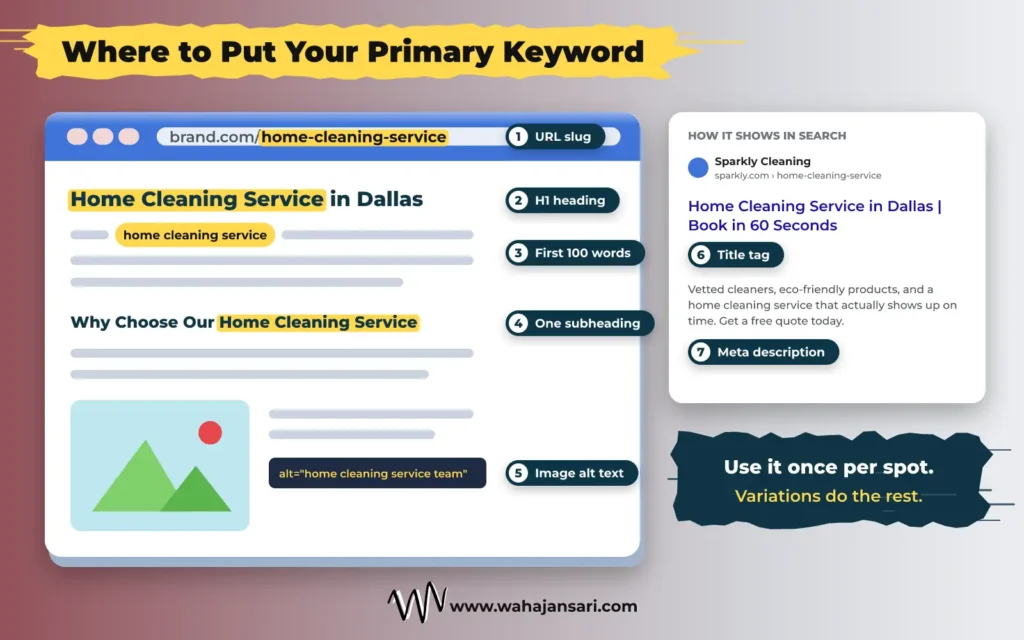
Your primary keyword belongs in these spots:
- Title tag, ideally near the front
- H1 heading
- First paragraph (roughly the first 100 words)
- One or two subheadings, only where it reads naturally
- URL slug
- Meta description
- Image alt text, but only if the image is actually about that topic
For the rest of the page, use natural variations and related words. A page about “SEO services” will naturally mention things like “SEO agency”, “search rankings”, and “organic traffic”. Google’s own SEO Starter Guide points out that people who know a topic well often search with different words than beginners, and that its systems can understand a page is relevant even when it doesn’t contain the exact search terms.
So no, you don’t need to repeat the exact phrase 15 times. You never did.
What about keyword stuffing? Google’s spam policies list repeating the same words or phrases so often that it sounds unnatural as a clear example of it. My simple test: read the paragraph out loud. If you sound like a broken radio ad, cut the repeats.
Write in Your Brand Voice, Not in “SEO Voice”
Here’s something I see all the time. A business has a fun, friendly personality on Instagram. Then you open their website and it reads like a government notice. “We are a leading provider of high quality solutions.”
Who talks like that?
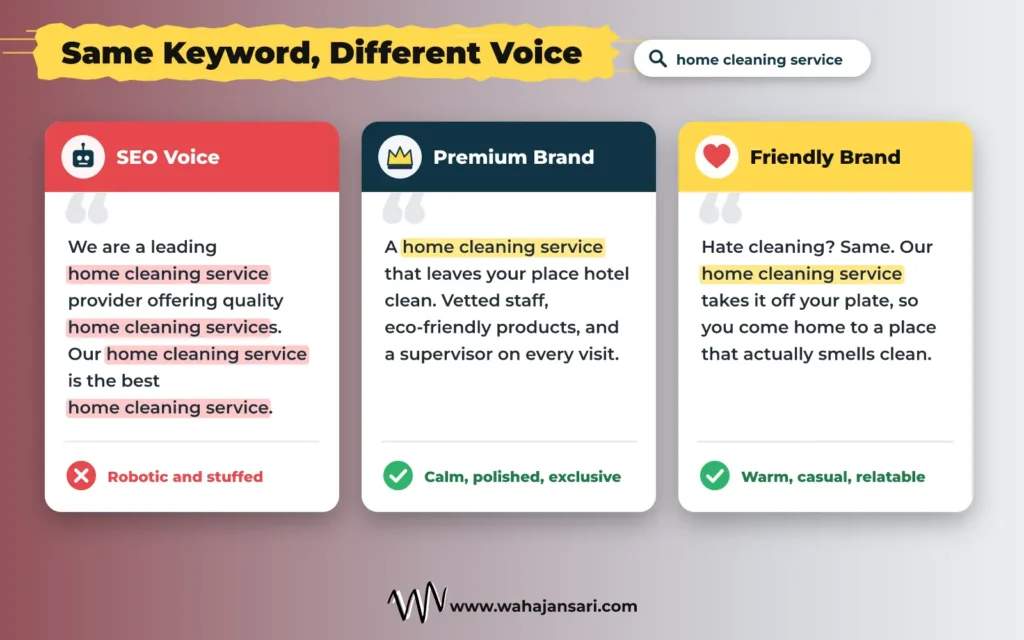
That’s what I call SEO voice. Stiff, generic, keyword heavy, and identical to every other page on the results page.
Your copy should sound like your brand. A law firm should sound calm, precise, and reassuring. A skateboard shop should sound like someone who actually skates. Same SEO rules, completely different words.
Let me show you. Same keyword, “home cleaning service”, two different brands:
- A premium brand: “A home cleaning service that leaves your place hotel clean. Vetted staff, eco-friendly products, and a supervisor on every visit.”
- A friendly local brand: “Hate cleaning? Same. Our home cleaning service takes it off your plate, so you come home to a place that actually smells clean.”
Both are SEO friendly. Both use the keyword. And nobody would ever mix them up.
That last part matters for SEO more than people think. When ten pages target the same keyword and all say the same thing in the same flat tone, nothing makes yours stand out. Google’s own guide to optimizing for generative AI features warns against simply recycling what’s already been said online. Your voice, plus your real knowledge, is what makes the page yours.
Before you write, set your voice in three quick steps:
- Pick three words that describe how your brand should sound (for example: direct, warm, expert).
- Write down words you always use and words you never use.
- Write one sample paragraph and put it next to a competitor’s. If you could swap the logos and nobody would notice, rewrite it.
A while back, I worked on a website for a home renovation company in Sterling, Virginia. They did kitchens, bathrooms, and a lot of basement finishing, which is a big deal in Northern Virginia.
Their homepage opened with this line: “Sterling VA home renovation contractor offering quality home remodeling services in Sterling VA and surrounding areas.”
Keyword? Check. Personality? Zero.
Then I got on a call with the owner, and he was a completely different person. He told me he still answers the phone himself. He said half his jobs start with fixing what the last contractor rushed. And at one point he said, “I’d rather lose a job than leave a homeowner with a mess.”
That one line was better than anything on his website.
So I didn’t invent a brand voice for him. I borrowed his. We picked three words: honest, local, no shortcuts. Then I rewrote the homepage the way he actually talks.
The main heading became “Home Renovations in Sterling, Done Right the First Time.” The intro said the owner picks up the phone himself, and that he’ll tell you straight if a project isn’t worth the money.
The keyword stayed. The robot left.
What I didn’t expect was what happened next. A few weeks later, the owner told me homeowners were calling and saying things like “you sound exactly like your website.” The calls got better too: fewer people hunting for the cheapest quote, and more people who wanted the job done properly.
That’s when it really clicked for me. Brand voice isn’t decoration. It brings in the right customers before they even pick up the phone.
I kept the results descriptive and didn’t invent any figures, because the post itself tells readers never to inflate. If you have real before-and-after numbers from a client like this, they’d be worth adding.
Show Your Authority Factors (Give Readers a Reason to Trust You)
“We’re a trusted company with years of experience.”
Sounds nice. Proves nothing. Every competitor says the exact same line.
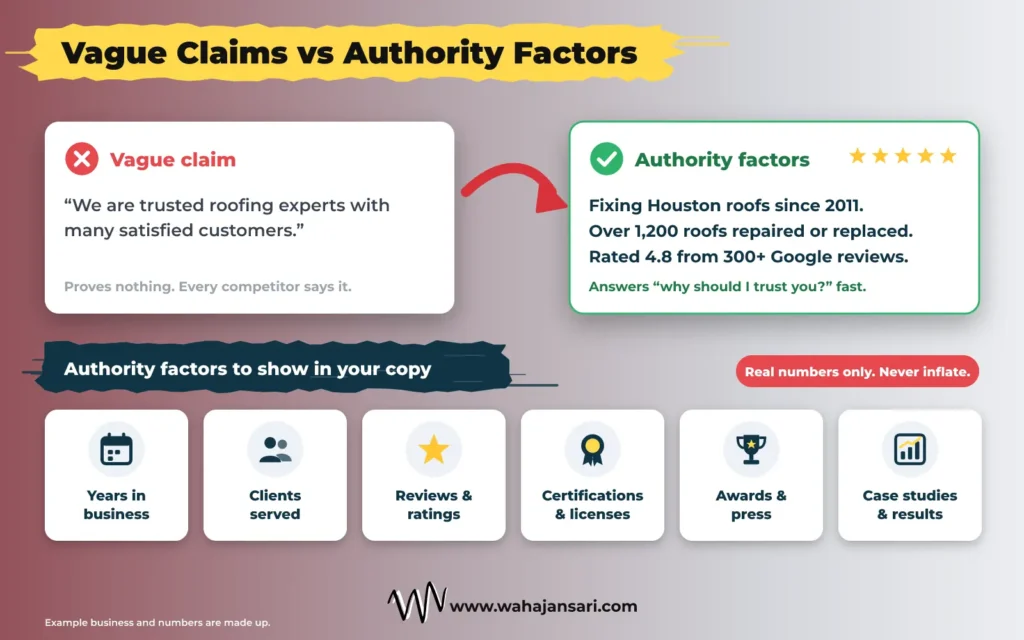
Authority factors are the specific facts that show why someone should pick you over the next result. Things like:
- How many years you’ve worked in your industry
- How many clients, customers, or projects you’ve handled
- Reviews and ratings, with the actual count
- Certifications, licenses, and memberships
- Awards or press mentions
- Real results from real work, like case studies
- Clients or brands you’ve worked with (with their permission)
Here’s the difference in action, using a made-up roofing company:
Before: “We are trusted roofing experts with many satisfied customers.”
After: “Fixing Houston roofs since 2011. Over 1,200 roofs repaired or replaced, and rated 4.8 from 300+ Google reviews.”
The second version answers the question every reader is quietly asking: “Why should I trust you?” And it does it in two lines.
This lines up with what Google says too. In its guide on creating helpful, reliable, people-first content, Google explains E-E-A-T (experience, expertise, authoritativeness, and trustworthiness) and says trust is the most important part of it. E-E-A-T isn’t a single switch you flip for rankings, but Google says its systems look for signals that line up with it. The same guide also says readers should be able to tell clearly who created the content.
So where do authority factors go? Near the top of the page (a short line under your H1 works great), right next to your call to action (that’s exactly where doubt kicks in), and in more detail on your About page.
One warning, and I mean this seriously: never inflate. If you’ve had 40 clients, say 40. Don’t round it up to “hundreds”. That same Google guide calls fake credentials and invented author details deceptive. And honestly, customers can smell it too. Small but real beats big and fake every single time.
Keep Headings Compact and Conversion Focused
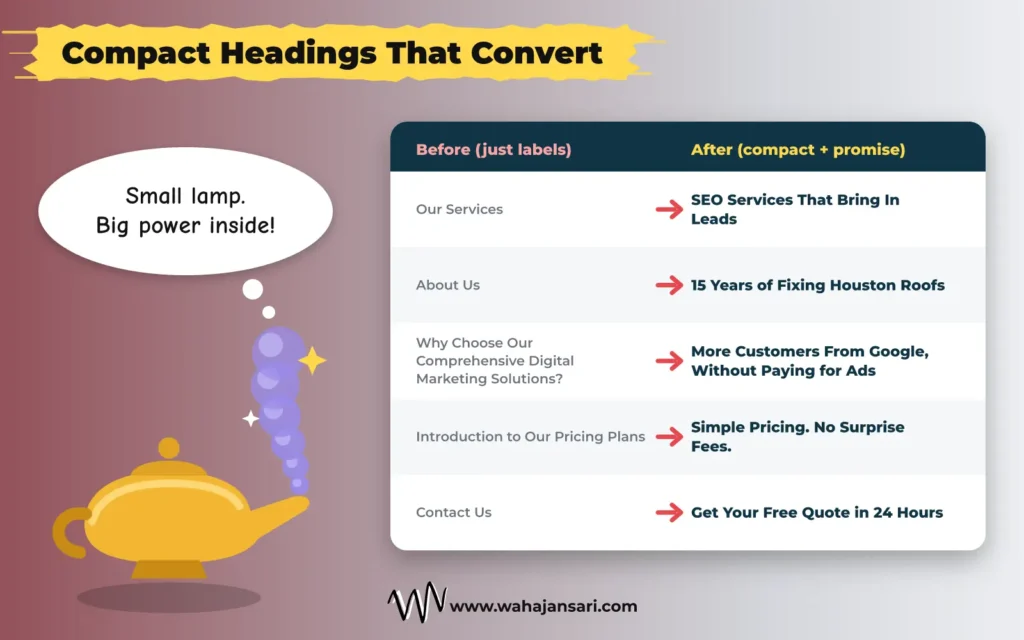
I like to think of a good heading like the genie in Aladdin’s lamp. Tiny lamp. Huge power inside.
Your heading should look small and simple from the outside, but it should carry the full promise of the section.
Why compact? Because people don’t read web pages top to bottom. They scan. Nielsen Norman Group’s research on how people read online (2020) found that people rarely read word by word. They skip, jump back, and rescan, and your headings are the signposts they’re scanning for. An older NN/g eyetracking study (2009) found that people scanning a list often take in only the first two words of each item. So put the important words first.
And why conversion-focused? Because a heading’s job isn’t to label a section. It’s to make the reader want the next paragraph, and eventually, to take action.
Here’s what that looks like:
| Before | After |
|---|---|
| Our Services | SEO Services That Bring In Leads |
| About Us | 15 Years of Fixing Houston Roofs |
| Why Choose Our Comprehensive Digital Marketing Solutions? | More Customers From Google, Without Paying for Ads |
| Introduction to Our Pricing Plans | Simple Pricing. No Surprise Fees. |
| Contact Us | Get Your Free Quote in 24 Hours |
See the pattern? The “before” headings just describe. The “after” headings promise something.
The rules I follow for headings:
- Keep it short. If a heading needs a comma and an “and”, it’s probably two sections.
- Lead with the word the reader cares about, not “Introduction to” or “Welcome”.
- Promise an outcome or a benefit where it fits.
- Use your keyword where it fits naturally, not in every heading.
- Never write a heading your section can’t deliver. Clickbait headings burn trust fast.
And no, don’t stress about perfect H2 and H3 order. Google’s starter guide says heading order doesn’t matter for Search, though it helps screen readers, so keep it tidy anyway.
Write Text That’s Simple and Detailed, Without Making It Lengthy
This is where a lot of people get confused. Detailed and long are not the same thing.
Detailed means you fully answered the reader’s question: what, how, how much, how long, and what if. Lengthy means you used 400 words to say what needed 80.
Your text should be easy to read, easy to understand, and complete. Here’s how I keep it that way:
- One idea per paragraph. Two to four lines for most of them.
- Short sentences. If a sentence has three commas, split it.
- Simple words. “Use” instead of “utilize”. “Help” instead of “facilitate”.
- Active voice. “We fix leaks within 24 hours” beats “Leaks are fixed within a 24 hour period”.
- Explain with an example, not a definition.
- Talk to the reader as “you”.
This isn’t just my personal taste. The US government’s plain language guidance recommends simple, clear words and active voice, and suggests cutting filler like “really” and “very”. Google’s starter guide also lists easy to read, well organized text as a sign of compelling content. If government websites are trying to sound human, your bakery website definitely can.
Here’s a paragraph from a made-up accounting firm:
Before: “Our organization is committed to delivering comprehensive accounting solutions designed to facilitate the financial management processes of small and medium sized enterprises across various industries.”
After: “We handle your bookkeeping, tax filing, and payroll, so you can stop doing accounts at midnight. We work with small businesses in retail, healthcare, and construction.”
Same meaning. Half the effort to read. Way more specific.
So, how long should SEO friendly copy be?
A lot of guides tell you SEO copy needs at least 300 or 350 words to rank. I disagree, and so does Google.
Google’s helpful content guidance flags writing to a word count as a warning sign and says plainly that Google doesn’t have a preferred word count. Its starter guide adds that content length alone doesn’t matter for ranking.
So write as much as the topic needs. A pricing page might need 300 words. A buying guide might need 2,500. Neither number is the goal. Answering the question is.
Don’t Skip the Copy Google Shows Before the Click
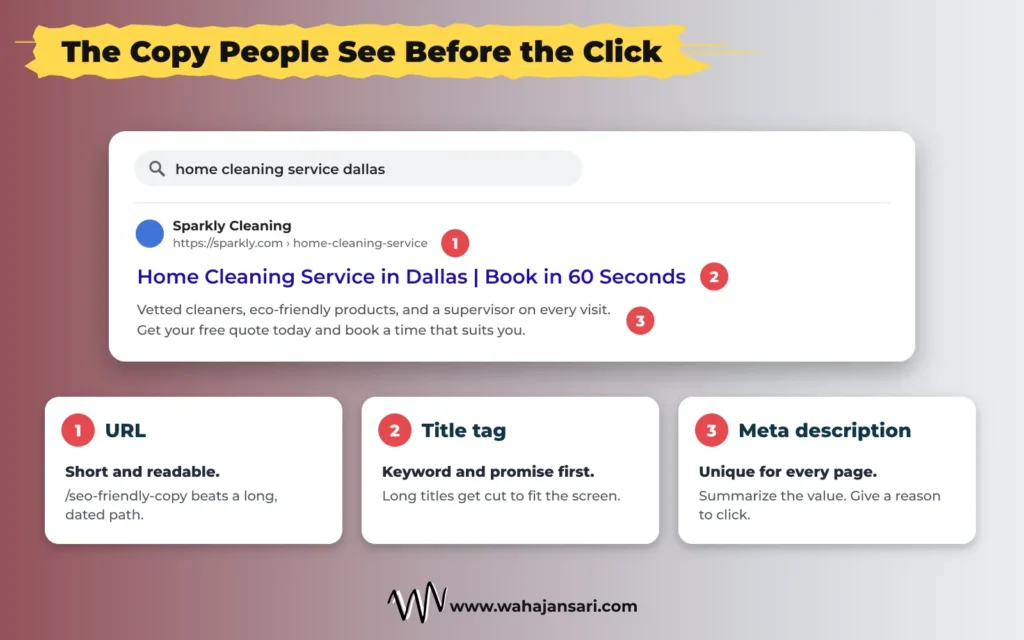
Honestly, this is the most underrated copy on your whole website. Your title tag and meta description are the only words people read before deciding whether to visit you at all. Treat them like ad copy, because that’s basically what they are.
Title tag. Google’s title link documentation says there’s no limit on how long a title element can be, but it gets cut off in results to fit the screen. So put your keyword and your main promise first. The same page also calls out titles that repeat the same phrase in different forms as unhelpful, so say it once and move on. Google can even use your H1 when it builds the title link, which is one more reason to make that heading clear.
Meta description. Google says snippets are mostly created from your page content, and it sometimes uses your meta description when that describes the page better. So write one anyway. Make it unique for every page, summarize what the reader gets, and give them a reason to click. Copying the same description across 50 pages helps nobody.
URL. Short and readable. “/seo-friendly-copy” beats “/blog/2026/10/the-ultimate-guide-to-seo-friendly-copy-for-websites” every time.
Image alt text. Describe what’s actually in the image. It’s for people who can’t see it, not a second place to stuff keywords.
Does SEO Friendly Copy Work for AI Search Too?
Fair question, now that so many people ask ChatGPT, Gemini, or Google’s AI Mode instead of scrolling through ten blue links.
For Google, the answer is yes. Google’s page on AI features and your website says there are no additional requirements or special optimizations needed to appear in AI Overviews or AI Mode. Its newer guide to optimizing for generative AI features (updated July 2026) goes further and shoots down a few trendy ideas. You don’t need an llms.txt file for Google Search. You don’t need to chop your content into tiny “chunks”. And you don’t need to rewrite your pages in some special AI style.
What it does reward is everything we’ve already covered: content written for people, organized with clear headings, with something genuinely unique to say.
Other AI assistants have their own systems, and nobody outside those companies can promise exactly how they pick sources. So here’s my take: don’t write one version for Google and another for AI. Answer the question directly at the start of each section, then explain. Keep important information in actual text, not trapped inside images. Use real numbers instead of vague claims. That’s the safest bet everywhere.
A Full Before and After Example
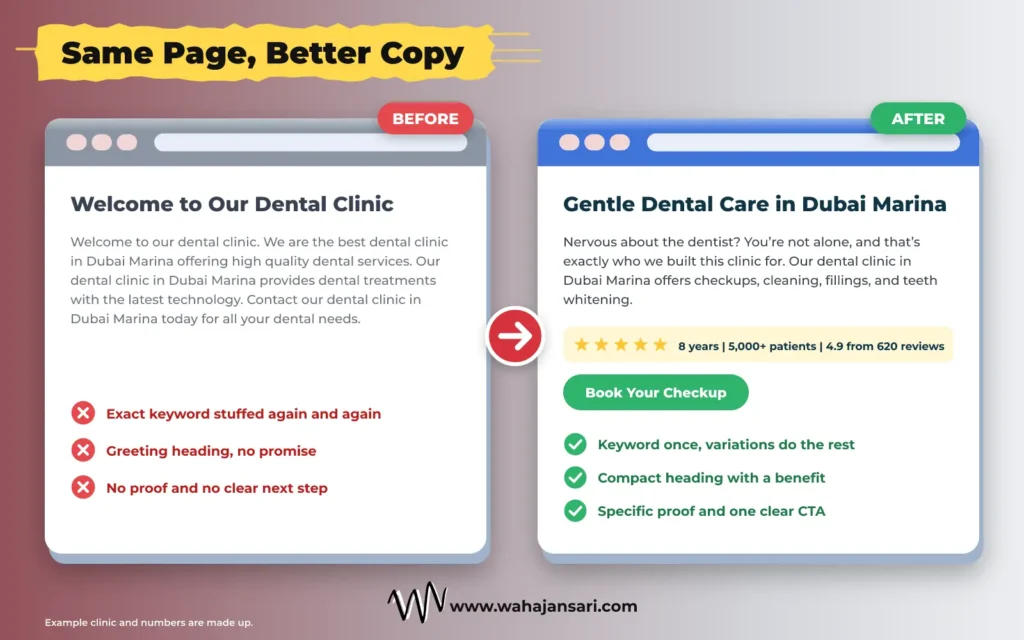
Let’s put everything together. Here’s the top section of a service page for a made-up dental clinic, targeting “dental clinic in Dubai Marina”.
Before
Heading: Welcome to Our Dental Clinic
Text: “Welcome to our dental clinic. We are the best dental clinic in Dubai Marina offering high quality dental services. Our dental clinic in Dubai Marina provides dental treatments with the latest technology. Contact our dental clinic in Dubai Marina today for all your dental needs.”
After
Heading: Gentle Dental Care in Dubai Marina
Text: “Nervous about the dentist? You’re not alone, and that’s exactly who we built this clinic for. Our dental clinic in Dubai Marina offers checkups, cleaning, fillings, and teeth whitening, with numbing options for every treatment.”
Authority line: “8 years in Dubai Marina. 5,000+ patients treated. Rated 4.9 from 620 Google reviews.”
Button: Book Your Checkup Today
(The numbers are made up for this example. Use your own real ones.)
So what changed?
- Keywords: The exact phrase appears once in the text instead of four times. “Dental care” and “dentist” do the rest naturally.
- Heading: It went from a greeting to a compact benefit. Small lamp, big genie.
- Brand voice: The text opens with the reader’s actual fear, in a warm and calm tone.
- Authority: “The best” became specific, checkable proof.
- Conversion: The button tells the reader exactly what to do next.
Same clinic. Same keyword. A page that now gives both Google and the patient a reason to pick it.
Your SEO Friendly Copy Checklist
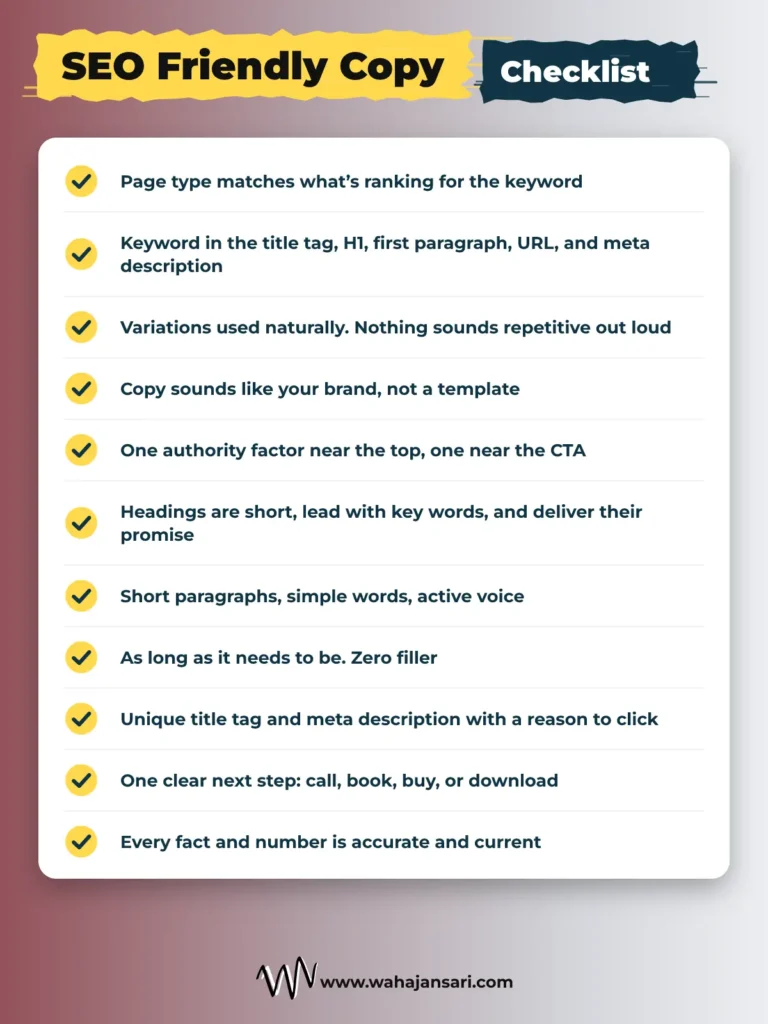
Run through this before you hit publish:
- My page type matches what’s ranking for the keyword (guide, service page, product page, etc.).
- The primary keyword is in the title tag, H1, first paragraph, URL, and meta description.
- Variations and related words are used naturally, and nothing sounds repetitive when read out loud.
- The copy sounds like my brand, not like a template.
- There’s at least one specific authority factor near the top and one near the call to action.
- Every heading is short, leads with the important words, and promises something the section delivers.
- Paragraphs are short, with one idea each, simple words, and active voice.
- The page is as long as it needs to be, with zero filler.
- The title tag and meta description are unique and give a reason to click.
- There’s one clear next step: call, book, buy, or download.
- Every fact and number is accurate and current.
Quick Answers to Common Questions
Is SEO copywriting the same as content writing?
Close cousins. SEO copywriting usually means pages built to convert, like service, product, and landing pages. Content writing usually means blog posts and guides built to inform. The real difference is the goal: copy pushes toward an action, content builds trust by answering questions. Both need to be SEO friendly, and the best pages do a bit of both.
How many keywords should one page target?
One primary keyword plus its close variations. If two keywords have different intent (one person wants to learn, the other wants to buy), they need two different pages. Forcing both onto one page usually means neither ranks well.
Can I use AI to write SEO friendly copy?
You can use it, but don’t publish it raw. Google’s guidance on using generative AI content says AI can help with research and structure, but mass-producing pages without adding value can break its scaled content abuse policy. It also says to fact-check everything AI writes, including titles and meta descriptions.
And here’s the bigger problem: AI doesn’t know your years in business, your client count, or how your brand sounds unless you tell it. Those are exactly the parts that make copy convert.
Final Thoughts
If you’re a small business owner reading this, here’s the one thing I want you to take away: SEO gets you found, but copy gets you chosen.
You don’t need to rewrite your whole website this weekend. Pick one page, your most important service or product page. Read it out loud. Swap one vague claim for a real number. Shrink your headings until they look like the genie’s lamp. Cut every sentence that doesn’t help the reader decide.
Then keep an eye on Search Console and your enquiries over the next few weeks.
Write for the person first. Make it easy for Google to understand second. When you get both right, ranking and selling stop being two separate jobs.
Hope this clears things up.
Discover more from Wahaj Ansari
Subscribe to get the latest posts sent to your email.