
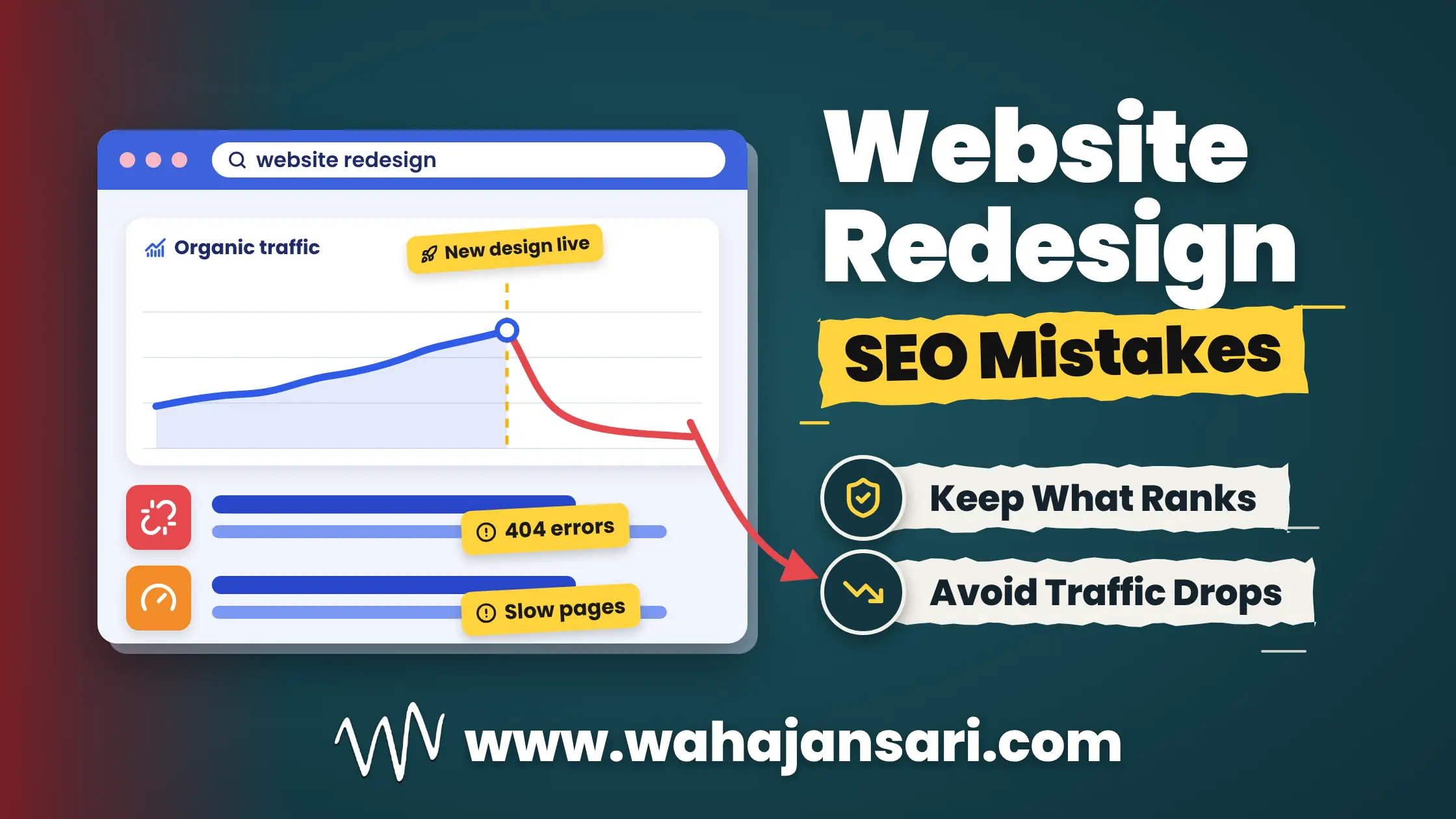
The new website goes live on Monday. Everyone loves it, the client shares it on LinkedIn, and the designer adds it to their portfolio. Two weeks later, someone opens Google Search Console and the traffic graph looks like a ski slope. Sound familiar?
So which redesign mistakes actually hurt rankings? The website redesign mistakes destroying SEO are the ones that quietly change what Google already trusts about your site: deleting or reshuffling content that ranks, changing URLs without 301 redirects, shipping heavier and slower pages, hiding content behind clicks, and launching with staging settings that block search engines. Notice what’s missing from that list? Colors, fonts, and logos.
A redesign itself isn’t the problem. Good website redesign SEO simply means the new site keeps everything the old one earned, then improves on it. Below, I’ll walk you through the seven mistakes I’d watch for, a website redesign checklist you can actually use, and what to check in the first 30 days after launch.
Why Does a Website Redesign Hurt SEO?
A website redesign hurts SEO when it changes the signals your rankings were built on: your URLs, your content, your internal links, and how fast your pages load. Google ranked your old site based on what it found there. Change too much at once and Google has to figure out your site all over again, while your traffic waits in the lobby.
Think of it like renovating a busy restaurant. New chairs, softer lighting, a nicer menu design? Your regulars won’t mind at all. But if you also change the address, drop half the dishes, and unplug the phone on the same day, don’t be surprised when the regulars stop showing up.
Even a well-planned change isn’t perfectly smooth. Google’s site move documentation says your visibility in Search can fluctuate temporarily while it processes URL changes. A small wobble is normal. A slide that keeps going for weeks usually points to one of the website redesign mistakes destroying SEO that I’ll cover below.
Redesign or Migration? Know Which One You’re Doing
A redesign changes how your site looks and works, while a migration changes where your content lives: the URLs, the domain, the CMS, or the hosting. The tricky part is that a lot of “redesigns” are secretly migrations. Your developer switches you to a new CMS, tidies up the URL structure, and calls the whole thing a redesign.
Why does this matter? Because the moment URLs or platforms change, website migration SEO rules apply: every old URL needs a planned destination, and the move needs to be tracked like a project. If only the visuals change and every URL stays exactly the same, your risk drops a lot (but not to zero, as you’re about to see).
The 7 Website Redesign Mistakes Destroying SEO
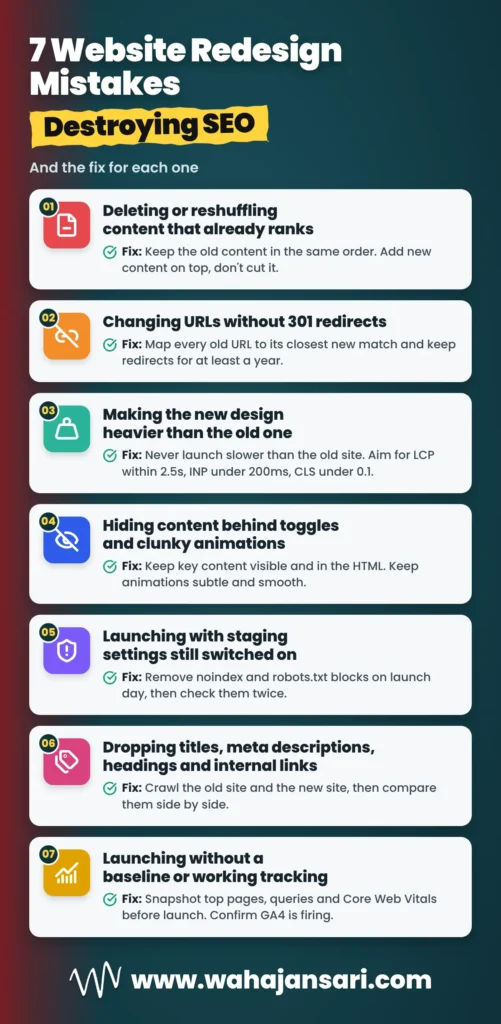
Here’s the short version: most website redesign mistakes destroying SEO happen in the planning stage, not on launch day. By the time the site is live, the damage is already baked in. Let’s go through them one by one, starting with the one people underestimate the most.
1. Deleting or Reshuffling Content That Already Ranks
Of all the website redesign mistakes destroying SEO, removing or rearranging content that already ranks is the most underrated. Designers love a clean, minimal page, and honestly, I get it. But Google doesn’t rank whitespace. It ranks the content that answers the search.
My rule is simple: keep the old content in the same order on the new design. You can add more content where it makes sense, like a new section, an FAQ, or better examples. What you shouldn’t do is cut paragraphs, merge sections, or push the main content to the bottom just because the new layout looks cleaner without it.
Why the same order? Because that page is ranking with that exact content, structured that exact way. If you change the design, trim the copy, and reorder the sections all at once and rankings drop, good luck figuring out which change caused it. Keep the content stable and the design becomes the only variable.
Let me give you an example. Say your service page ranks on page one with a 900-word breakdown of your process, pricing factors, and common questions. The new design turns it into three short cards and a big “Contact Us” button. It looks gorgeous, and it just deleted the reasons Google ranked it.
Let me paint you a picture. A family dental practice in Clearwater, Florida ranks in the top three for “dentist in Clearwater” and “emergency dentist Clearwater FL.” Their website looks a bit dated, sure, but the phone rings every single day. So the owner decides it’s time for a fresh, modern look.
The new design is gorgeous. It has beach-blue colors, a full-screen video of smiling patients walking along Clearwater Beach, and a homepage that fades in section by section as you scroll. The old 1,200-word dental implants page, the one explaining the procedure, costs, insurance, and recovery, becomes three icons and a “Book Your Smile” button.
And everything that didn’t fit the clean new look? It gets tucked into dropdown toggles labeled “Learn More.” Nobody touches a single keyword. On paper, nothing about the SEO changed.
Now fast forward three weeks. The emergency dentist page that used to sit at position 2 has slid to page two, the implants page has almost disappeared, and the front desk is wondering why the phones went quiet. Meanwhile, someone opening the site on their phone in a Tampa Bay parking lot waits forever for that hero video, then watches the page jump around as each section animates in.
Here’s how I’d fix it, in this order. First, I’d put the original content back on the implants and emergency pages, in the same order it was in before, and add any new FAQs underneath instead of replacing anything. Then I’d swap the hero video for a compressed image, pull the “Learn More” content out of the toggles so it’s visible by default, and tone the animations down to a simple fade. After that, I’d compare Search Console against the pre-launch numbers every week until things settle.
The lesson? Someone searching “emergency dentist near me” at 11 at night with a cracked tooth doesn’t care about your scroll animations. They want answers fast, and Google ranked the old site because it gave them exactly that. Keep what ranks, make it faster, and only then make it pretty.
2. Changing URLs Without 301 Redirects
Changing URLs without 301 redirects tells Google your old pages are gone, and the backlinks and ranking history pointing at them go with them. Visitors hit a 404 page, Google eventually drops the old URL, and the new URL starts from scratch. It’s like moving house without forwarding your mail.
The fix is a redirect map: every old URL in one column, its closest new match in the other. Google’s site move guide suggests building that list from your sitemaps, top-traffic pages, the Search Console links report, and server logs, then keeping the redirects live for at least a year. Use permanent redirects (301 or 308), since Google treats the target of a permanent redirect as the canonical URL, while a temporary 302 keeps the old URL showing in results.
And please, don’t redirect everything to the homepage. It feels like a shortcut, but Google says sending lots of old URLs to one irrelevant page like the homepage can confuse users and may be treated as a soft 404. Redirect each page to its closest match, or let it return a 404 if there’s honestly no replacement.
3. Making the New Design Heavier Than the Old One
A new design that’s heavier than the old one slows your pages down, and slow pages hurt both rankings and conversions. Big hero videos, five font families, sliders, chat widgets, and extra tracking scripts all add weight. Each one feels small on its own. Together, they turn a quick site into a sluggish one.
This isn’t just a hunch about modern web design. HTTP Archive’s 2025 Web Almanac found the median mobile home page got about 8.4% heavier in a single year, and it’s roughly three times heavier than it was in 2015. The web keeps getting fatter, and a redesign is usually the moment your site joins the trend.
Google’s Core Web Vitals guidance gives you clear targets: Largest Contentful Paint within 2.5 seconds, Interaction to Next Paint under 200 milliseconds, and Cumulative Layout Shift below 0.1. My advice? Test the new design against these numbers on staging, and if it’s slower than the old site, it’s not ready to launch.
To be fair, speed isn’t everything. Google’s page experience documentation says it still shows the most relevant content even when page experience is weak, and that a great experience helps most when lots of pages are equally relevant. So speed won’t rescue thin content, but in a competitive niche, it’s often the tiebreaker you can’t afford to lose.
4. Hiding Content Behind Toggles, Tabs, and Clunky Animations
Complex design patterns like dropdown toggles, click-to-reveal sections, and heavy animations can hurt SEO in two ways: Google may not see the content, and users may not bother looking for it. Both end up in the same place. Fewer people find your page, and the ones who do leave faster.
Here’s the technical part. Google’s lazy-loading guidance says Google Search doesn’t interact with your page, so it won’t click a button to reveal content. If your toggle only loads text after a click (instead of having it in the HTML and simply hiding it), that text may never be seen by Google. A basic accordion with the content already in the page is usually fine for crawling.
The bigger issue is usually user experience. When a visitor has to open five toggles to find your pricing, most of them won’t. And animations that stutter, delay the content, or shove elements around make the page feel broken, even if it technically works.
Chrome’s Lighthouse docs explain that non-composited animations can look janky on low-end phones and can push other elements around, which counts toward Cumulative Layout Shift. So that fancy fade-and-slide effect on every section? It might be costing you more than it’s worth. Keep your most important content visible by default, and keep animations subtle and smooth.
5. Launching With Staging Settings Still Switched On
One of the most painful SEO mistakes is launching the new site with staging settings still active, like a sitewide noindex tag or a robots.txt file that blocks every crawler. The site looks perfect to humans. To Google, it’s basically wearing an invisibility cloak.
The opposite happens too: the staging site gets indexed and competes with your live site using the same content. Google’s robots.txt documentation is clear that robots.txt isn’t a way to keep a page out of Google, so protect staging with a password or a noindex directive instead. Then, on launch day, remove those blocks from the live site and check them twice.
This is one of those website redesign mistakes destroying SEO that takes five minutes to prevent and weeks to recover from. Put it at the very top of your launch-day list.
6. Dropping Titles, Meta Descriptions, Headings, and Internal Links
A redesign often wipes out the on-page SEO hiding inside the old templates: title tags, meta descriptions, H1s, image alt text, schema markup, and internal links. Nobody deletes them on purpose. The new theme just doesn’t carry them over, and nobody checks.
Internal links are the sneaky one. A shiny new mega menu or a “simplified” navigation can remove links to pages that used to sit two clicks from the homepage, and suddenly they’re buried five clicks deep. Google’s site move guide also says to update internal links so they point straight at the new URLs, which keeps crawlers from bouncing through redirects all day.
Before launch, crawl the old site with an SEO crawler and export every title, meta description, H1, and canonical tag. After launch, crawl the new site and compare the two side by side. If a page lost its title or half its internal links, you’ll spot it in minutes instead of months.
7. Launching Without a Baseline or Working Tracking
If you don’t record your traffic, rankings, and top pages before launch, you can’t prove what the redesign changed. And if the new site goes live without the GA4 tag or with broken Search Console verification, you’re flying blind right when it matters most.
So take a snapshot before you launch: top landing pages by organic traffic, the queries driving them, your indexed page count, and Core Web Vitals. It’s boring work, I know. But when your boss or client asks “did the redesign hurt us?”, you’ll have a real answer instead of a shrug.
How to Redesign a Website Without Losing SEO
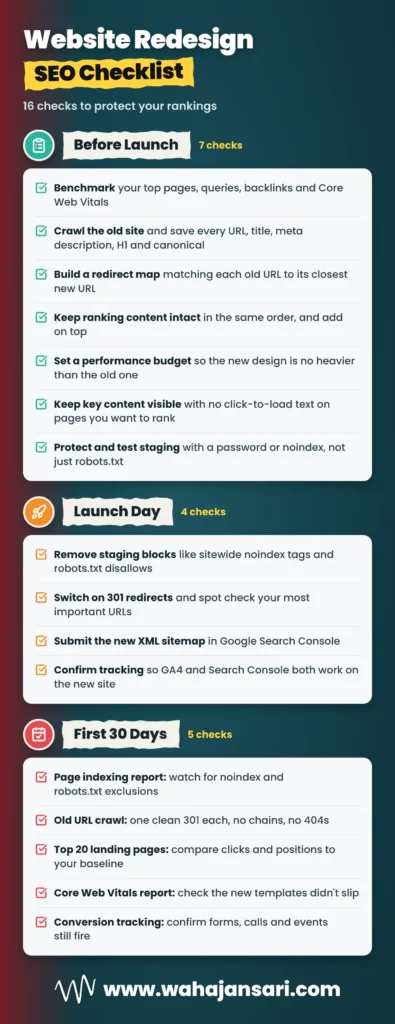
To redesign a website without losing rankings, protect what already ranks, change as few things at once as you can, and test everything on staging before it goes live. That sounds obvious. But the details are where most redesigns slip, so here’s the website redesign checklist I’d follow:
- Benchmark first. Export your top pages, queries, backlinks, and Core Web Vitals from Search Console and GA4.
- Crawl the old site. Save every URL, title tag, meta description, H1, canonical, and internal link count.
- Build the redirect map. Match every old URL to its closest new URL, including images and PDFs that earn links.
- Keep ranking content intact. Same content, same order, add on top, and never trim pages that bring in traffic.
- Set a performance budget. The new design shouldn’t be heavier or slower than the old one.
- Keep key content visible. No click-to-load text for anything you want to rank.
- Protect staging properly. Use a password or noindex, not just robots.txt.
- Test on staging. Crawl it, run PageSpeed Insights, and test forms, tracking, and mobile layouts.
- Launch carefully. Remove the staging blocks, switch on redirects, submit the new XML sitemap, and confirm GA4 and Search Console are working.
- Monitor for 30 days. Compare against your baseline every week.
Notice that most of this checklist happens before launch. That’s on purpose, because the goal is to catch website redesign mistakes destroying SEO before a single visitor sees the new site. Fixing SEO mistakes on staging costs you an afternoon, while fixing them after launch can cost you months of traffic.
SEO Issues After Website Redesign: What to Check in the First 30 Days
Most SEO issues after website redesign launches show up within the first few weeks, in Search Console and in your crawl data. Don’t wait for the monthly report. Check these in the first week, then weekly until things settle:
- Page indexing report: look for a spike in pages “Excluded by noindex tag” or “Blocked by robots.txt.”
- 404s and redirect chains: crawl your old URL list and confirm each one returns a single 301 to the right page.
- Top landing pages: compare clicks and average position for your top 20 pages against your baseline.
- Core Web Vitals report: check whether the new templates pushed pages into “Needs improvement” or “Poor.”
- Tracking: confirm GA4 and your conversion events are firing on the new templates.
Each of the website redesign mistakes destroying SEO leaves a different fingerprint, so read the pattern. If traffic dips a little across the whole site but rankings mostly hold, give it time, since Google is still processing the changes. If specific pages crashed, compare their old and new versions side by side, because missing content, a broken redirect, or a lost title tag is usually the culprit. And if the whole site vanished overnight, check for a noindex tag before you do anything else.
FAQs
How long does it take for SEO to recover after a website redesign?
A clean website redesign usually settles within a few weeks, but bigger changes take longer. When URLs change, Google says most pages on small and medium sites take a few weeks to move, larger sites take longer, and visibility can fluctuate along the way. If you’re still down after a couple of months, stop waiting and start auditing, because something is probably broken.
Should I change my CMS and redesign my website at the same time?
If you can avoid it, don’t do both at once. Changing the platform, the URLs, the content, and the design together means that if rankings drop, you can’t tell which change caused it. When you have no choice, keep the URLs and content identical during the move so there are fewer moving parts for Google to process.
Can a redesign affect my visibility in Google’s AI Overviews?
Yes, because AI Overviews draw on pages Google has indexed. Google’s AI features documentation says a page needs to be indexed and eligible to show with a snippet to appear as a supporting link, and that no special extra optimization is required. So if a redesign deindexes pages or strips out the content that answered the question, you can lose those citations along with your rankings.
Do I need to update my XML sitemap after a redesign?
Yes, if any URLs changed. Your sitemap should list only the new, live URLs, and Google’s site move guide recommends submitting the new sitemap in Search Console. Leaving old, redirected URLs in your sitemap just sends Google mixed signals.
Final Thoughts
Here’s the thing: none of the website redesign mistakes destroying SEO are hard to avoid. They happen because the redesign gets treated as a design project, and SEO gets invited a week before launch. Flip that around and bring SEO in from day one.
If you remember one thing from this post, make it this: keep what already works, then improve on it. Same content, same order, the same URLs wherever possible, and a site that’s lighter and smoother than the old one, not heavier. Do that, and your new website gets to look better while ranking just as well as the old one, or better.
Discover more from Wahaj Ansari
Subscribe to get the latest posts sent to your email.